

How to Get More Students for Your Study Library
Key takeaways
- Students search "library near me" on Google Maps, so a complete Google Business Profile is the first job.
- Genuine reviews and real photos of seats, AC and washrooms help students choose you.
- Follow up every enquiry within a day. An enquiry nobody calls back is a seat lost to the library down the road.
- Coaching centres, hostels and PGs are where your future students already are.
- Keeping a student is cheaper than finding a new one: notice who stops coming and call them.
Most study libraries fill their seats from a small area around them. That makes marketing simpler: be easy to find, look trustworthy, and follow up with every student who shows interest.
1. Set up your Google Business Profile
Students search "study library near me" or "reading room near me" on Google Search and Maps. A Google Business Profile is free, and it decides whether you show up.
- Use your real library name, the exact location pin, your phone number and opening hours.
- Choose the category that best describes you, such as Library.
- Add clear photos: the entrance, the hall, a single desk, the AC, washroom and drinking water. Students want to see the actual seats.
- Keep your hours correct, including holidays.
- Post an update when seats open up, or before exam season.
Google Maps for Study Libraries walks through every step, from verification to reviews.
2. Collect genuine reviews
- Ask students who have been with you for a month or more, and are happy, to leave a review. A short message with your review link works well.
- Reply to every review, including critical ones, politely and specifically.
- Never buy reviews or post fake ones. Google can remove them, and students notice.
3. Give your library a web page
A simple page with photos, facilities, shift timings, prices and an enquiry form answers most questions before a student calls. Put its link in your Google Business Profile, your WhatsApp status and your posters.
4. Be where students already are
- Coaching centres: ask nearby institutes if you can put up a poster, or offer their students a small discount.
- Hostels and PGs: students in shared rooms are your core audience. Posters at the entrance and an arrangement with the owner work well.
- Colleges and bookshops: notice boards, and the shops where students buy exam books.
- Exam calendars: promote before major exam seasons, when students are actively looking for a quiet place.
5. Make it easy to try
- A free trial day lets a student feel the quiet, the seat and the AC for themselves.
- A small first-month offer, or a discount on a 3-month plan, makes switching from another library easier.
- A referral discount for both the member and the friend they bring.
6. Use WhatsApp and social media
- Put your library page link and a few photos in your WhatsApp status, especially when seats open up.
- Keep a WhatsApp broadcast list of enquiries who agreed to hear from you, and send only useful updates: new seats, exam-season offers and holiday timings.
- Short videos work well on Instagram and YouTube Shorts: the quiet hall at 6 am, the cool AC hall in summer, the short walk from the coaching centre to your door.
- Name your area in posts and captions, so local students find them.
7. Show results and student life
- A toppers' wall with photos, shared with permission, of students who cleared exams while studying with you.
- Monthly recognition for the most study hours or the best attendance.
- Short notes from current students about why they chose you, shared with their consent.
Results matter to parents too, and parents often pay the fees.
8. Follow up every enquiry
Write down every walk-in and call with the name, phone number, shift wanted and a follow-up date. Call back within a day. Students often visit two or three libraries before deciding, and the one that follows up politely is often the one they pick.
9. Keep the students you have
- Notice students who have not come for three or more days, and check in with them.
- Remind students before their plan ends, not after.
- Fix complaints quickly: noise, broken lights, Wi-Fi and washrooms.
- Enforce quiet hours properly. A genuinely quiet hall is why students stay for a year instead of a month.
Why Students Leave a Study Library covers the warning signs and what to do.
How Libolink helps
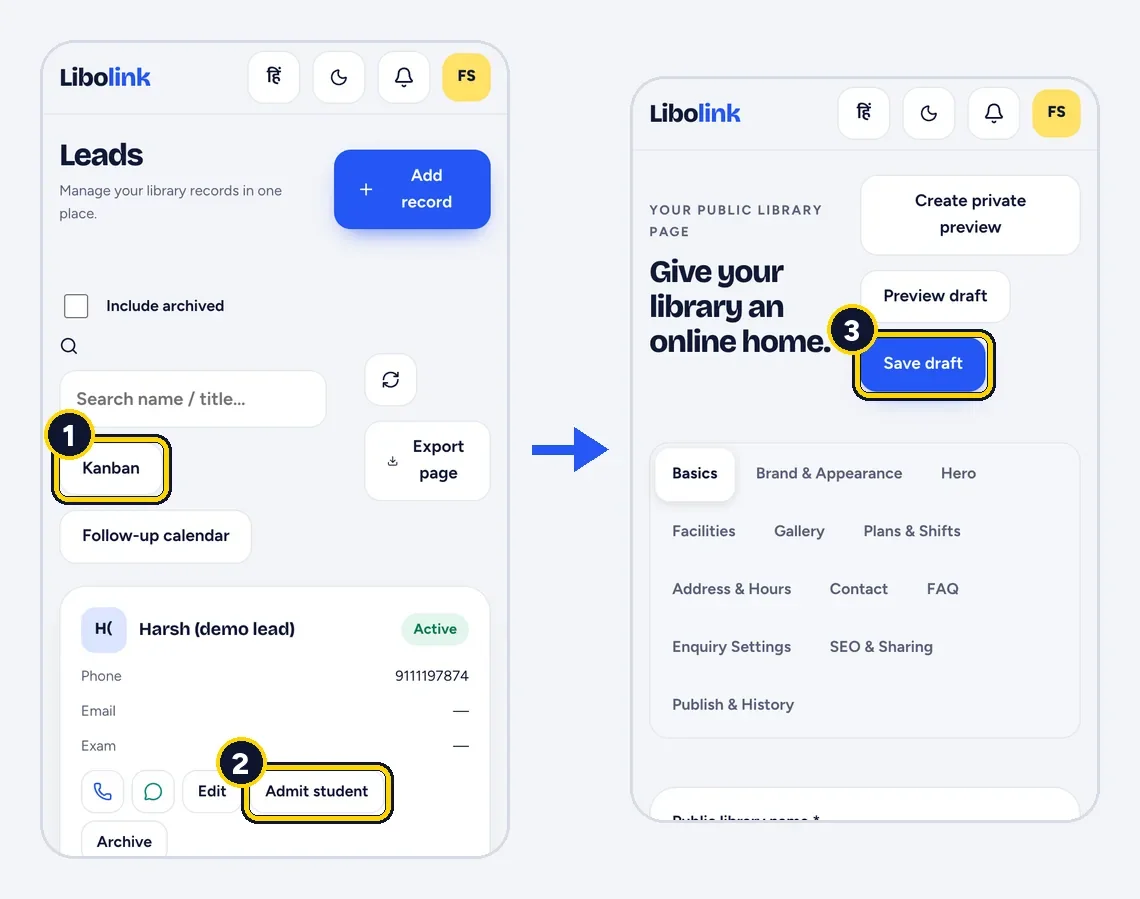
Libolink gives every library its own public web page with photos, facilities, plans and timings, an enquiry form and a WhatsApp share button, and libraries can choose to appear in the Libolink library directory. Every enquiry from the page lands in Leads, a board with stages and a follow-up calendar. When the student joins, Admit student turns the enquiry into a student record with their details already filled in. The home screen also shows students who have stopped coming and memberships that end soon. See the features or browse the library directory.
Frequently asked questions
How can I promote my self-study library?
Start with a complete Google Business Profile, real photos and genuine reviews. Then reach students where they already are (coaching centres, hostels and PGs), offer a free trial day, and follow up every enquiry within a day.
How do I get my library on Google Maps?
Create a free Google Business Profile with your library name, exact location, phone number, hours and photos. Google usually asks you to verify the business before you can manage the profile.
How do I stop students leaving my library?
Follow up with students who stop coming for a few days, remind them before their plan ends, keep the hall quiet and clean, and fix complaints quickly.