

Reading Room Management Software: What to Look For in India
Key takeaways
- A reading room needs software for five daily jobs: seats by shift, memberships, fees, attendance and reminders.
- Check how each app stops two students getting the same seat at the same time, and how it checks UPI payments.
- Published prices in India range from free plans to about ₹5,500 a year (October 2026).
- A good setup takes one afternoon: seats, shifts and plans first, then an Excel import of your students.
- Ask whether students get their own app; it is what cuts the questions at your desk.
A reading room rents quiet study space by the month: a desk or seat for a shift, a locker if you have them, Wi-Fi, and silence. Most reading rooms in India start with a paper register and a WhatsApp group. Software becomes worth it when the register can no longer answer simple questions quickly: which seats are free in the evening shift, who has not paid this month, and who came today.
This guide explains what reading room management software should do, what it costs, and how to set it up.
The five jobs software must do every day
- Seats by shift. One seat can belong to a morning student and an evening student. The software must know both, and refuse a third booking that overlaps.
- Memberships. Monthly, 3-month or 6-month plans with start and end dates, renewals and, if you take one, a deposit.
- Fees. Cash and UPI in one list, with a receipt for each payment and a clear list of who still owes.
- Attendance. Who came, when, and for how long, without a register at the door.
- Reminders. Fee due and renewal reminders sent for you, so you are not calling each student.
A checklist to use when comparing apps
| Feature | Why it matters | What to ask the vendor |
|---|---|---|
| Seat map by shift | Avoids double bookings and shows free seats at a glance | Can one seat hold different students in different shifts? |
| UPI fee checks | Fake payment screenshots are common | How is a UPI payment confirmed before a receipt? |
| Attendance | A register at the door is slow and easy to fake | Can a shared photo of the QR code be used to check in? |
| Student app | Students stop asking the desk about days left and receipts | What can a student see on their own phone? |
| Excel import | Your register already holds months of data | Can I upload my existing list, and what happens to bad rows? |
| Reminders | Late fees are the biggest leak in a reading room | Which reminders are sent automatically, and by which channel? |
| Data export | You should never be locked in | Can I download all my data at any time? |
What reading room software costs in India
Typical prices on Indian apps' own pricing pages, October 2026:
| Kind of app | Published price |
|---|---|
| Free plans | Free up to 20 to 50 students; paid plans from about ₹750 a year |
| Low-price apps | About ₹150 to ₹200 a month |
| Per-seat pricing | About ₹150 a month for 50 seats, rising with each slab of seats |
| Libolink | ₹499 a month, billed for 3, 6 or 12 months, up to 1,000 students; first month free |
The cheapest app is not always the cheapest choice. One missed fee a month from a ₹1,000 seat costs more than most of these subscriptions.
Setting up in one afternoon
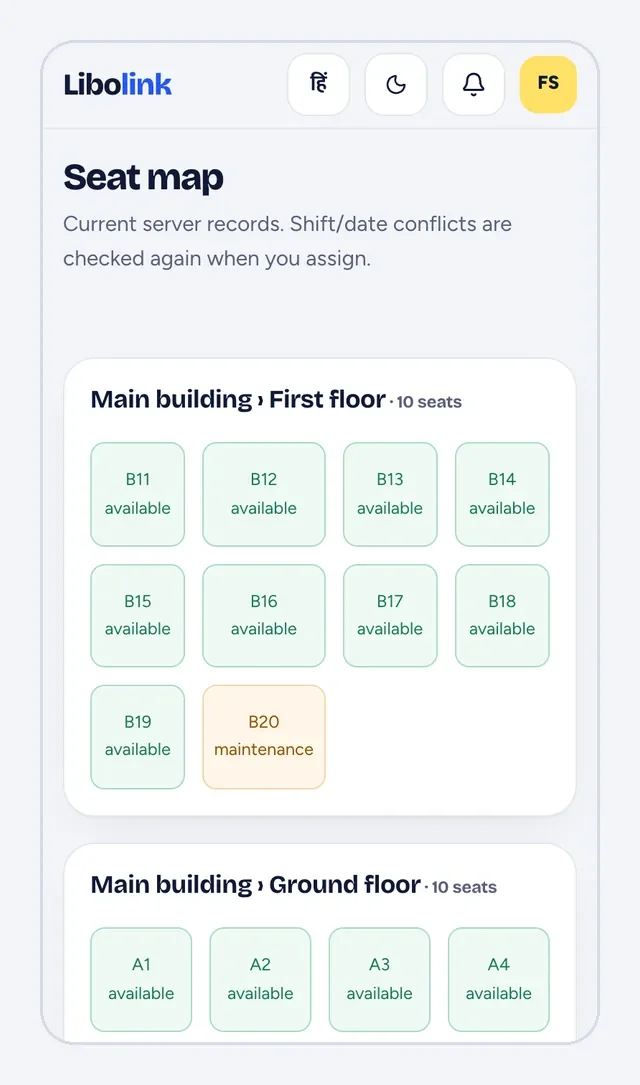
- Seats. Name them the way your students already do (A1 to A40, B1 to B20) and group them by room or floor.
- Shifts. Add your shifts with their timings, for example morning, evening and full day.
- Plans. Add each plan with its duration, price and deposit.
- Students. Import your register from Excel, or add students one by one with their plan, shift and seat.
- Rules and Wi-Fi. Put your library rules and the Wi-Fi password where every student can read them.
- Fees. Add your UPI ID or QR so students can pay the exact amount from their phone.
How Libolink runs a reading room
- The home screen is a to-do list: fees due, payments to verify, renewals and enquiries, each opening the actual students.
- The seat map shows who is in the library right now; a seat whose student has not come can go to a walk-in for the day.
- Students check in by scanning a desk QR code that changes every 90 seconds.
- Each student has their own app with a library card, receipts, notices, a study timer and your study material.
- It works in English and Hindi. See how it works or the pricing.
Mistakes to avoid
- Choosing by feature count. Pick the app your desk staff find fastest for the daily jobs above.
- Skipping the import. Starting with an empty app means keeping the register as well; import your students on day one.
- Not telling students. Share the student sign-in link on your WhatsApp group the same day, or the app stays half-used.
- Keeping cash outside the app. Record every cash payment too, or the dues list will never be right.
For a side-by-side of the main apps, read library management apps in India compared.
Frequently asked questions
What is reading room management software?
Software that runs a paid study space: seats by shift, memberships, fees, attendance and reminders, usually with a mobile app for owners and, in some apps, for students too.
Is there free reading room software?
Yes. As of October 2026, several apps publish free plans with student caps. Libolink is free for the first month with every feature, then paid, with custom plans for small libraries.
Can students see their seat and fees on their phone?
In Libolink, yes: each student signs in to see their library card, seat, days left, fee receipts and notices.
How long does it take to move from a register to software?
About an afternoon for seats, shifts and plans, plus an Excel import of your students. Run the register alongside it for the first week.