

Library Management Software for Study Libraries: What to Check
Key takeaways
- Software for book-lending libraries (catalogues, issue and return) is different from software for study libraries (seats, shifts, fees, attendance).
- Must-haves for a study library: a seat map with shift clash checks, fee records with UPI verification and receipts, and attendance that is hard to fake.
- A student app saves staff time: students see their own fees, receipts, seat and attendance instead of asking at the desk.
- Check that you can import your existing students from Excel and export all your data at any time.
- Try two or three free trials with your real seat map and fee cycle before choosing.
"Library management software" means two very different things in India. Make sure you are looking at the right kind before comparing features.
Book libraries and study libraries need different software
Book-lending libraries in schools, colleges and public institutions need an integrated library system: a catalogue, barcodes, book issue and return, fines and member cards. Well-known options include Koha (open source), SOUL from INFLIBNET and e-Granthalaya from NIC.
Self-study libraries and reading rooms rent seats by shift and collect monthly fees. They rarely lend books. What they need is seat and shift management, membership and fee tracking, attendance, enquiries and a way to reach students. Software built for book catalogues does not handle seat clashes or UPI fee checks, so confirm that a product was designed for study libraries.
Checklist: core features
Seats and shifts
- A visual seat map grouped by hall, floor or zone.
- Shifts with their own timings and capacity, and full-day plans that hold a seat in every shift.
- A clash check that stops two students being given the same seat in the same shift.
- Seats you can mark as under maintenance, and a waitlist for when the library is full.
Memberships and fees
- Plans with price, duration and deposit, including discounted multi-month plans.
- UPI and cash recorded in one place, with a way to check UPI payments against the UTR in your bank app.
- An automatic receipt for every payment, and a clear list of pending fees.
- Refunds recorded properly, so revenue figures stay correct.
Attendance
- A method students cannot fake from home. A QR code that keeps changing is much harder to misuse than a printed one.
- A staff-assisted fallback for students whose phone is not working.
- A list of students who have not come for several days, so you can follow up before they quit.
Students and staff
- Each student gets their own login to see fees, receipts, seat and attendance.
- Separate staff logins with permissions, so a receptionist sees only what they need.
- Support for more than one branch if you plan to grow.
Growth
- An enquiry list with follow-up dates, so walk-ins and calls are not forgotten.
- A public web page for your library with photos, plans and an enquiry form.
- Notices and reminders sent only to the students they concern.
Checklist: practical points
- Works on a phone. Most owners run the library from a phone, so try the app, not only the desktop website.
- Language. Staff and students may prefer Hindi. Check whether the app supports it.
- Moving in your data. You should be able to import existing students from Excel without typing each one.
- Getting your data out. Ask how to export students, payments and attendance. Your records belong to you.
- Privacy. Student phone numbers and addresses are personal data under India's Digital Personal Data Protection Act, 2023. Ask who can see student data and how access is controlled.
- When the subscription ends. Ask whether your data is kept, and whether you can still view and export it.
- Price. Look for published prices and a free trial, and check each plan's limits on students, staff and seats.
Questions to ask any vendor
- Can you show how a student pays a fee by UPI, from their phone to my approval and their receipt?
- What stops two students being given the same seat in the same shift?
- How do students mark attendance, and what stops misuse?
- Can I import my students from Excel, and export all my data whenever I want?
- What happens to my data if I stop paying?
- Is there a student app on Android and iPhone, or only a website?
How to compare fairly
Pick two or three products and use each free trial with your real setup: your shifts, your plans and part of your seat map. Add five or ten real students, record one UPI payment and one cash payment, and mark attendance for a day. Within a week it is usually clear which one fits the way your library actually works.
Where Libolink fits
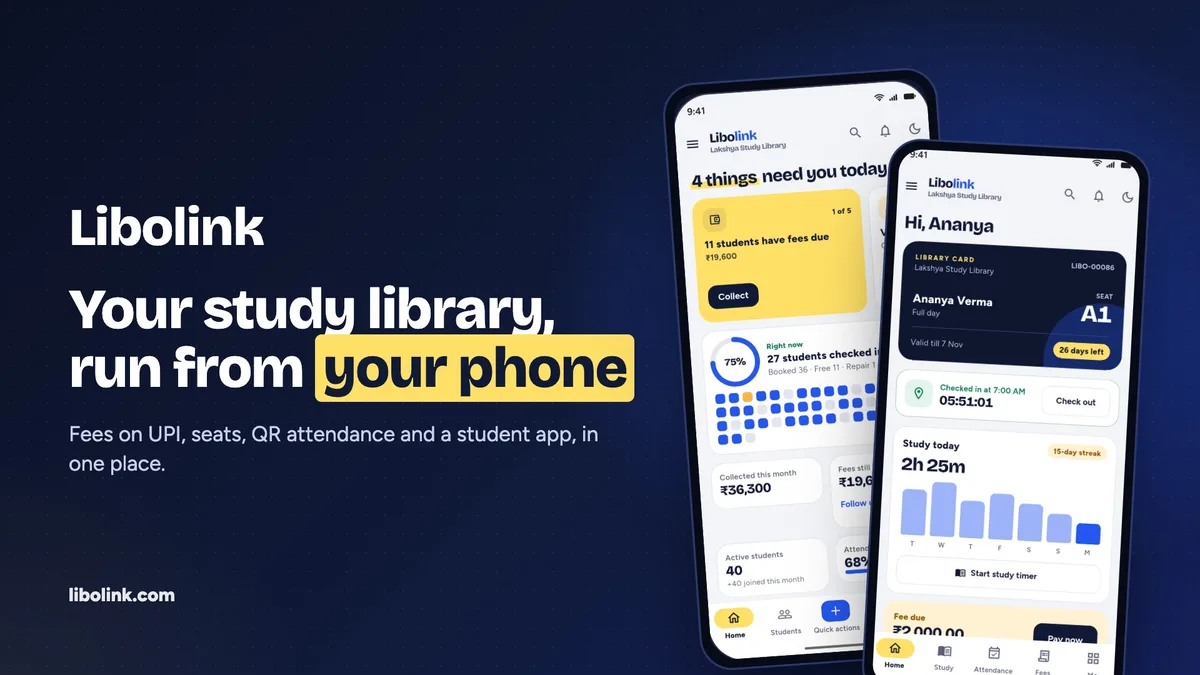
Libolink is library management software built only for self-study libraries, reading rooms and study centres in India. It covers the core checklist above: seat maps with shift clash checks and a waitlist, UPI and cash fees with UTR verification and automatic receipts, attendance by a QR code that changes every 90 seconds with an optional location check, an enquiry board with follow-ups, Excel import, staff permissions and branches. Every student gets the Libolink app with a library card, receipts and a study timer. It runs on the web, Android and iPhone, in Hindi and English, and starts with a free trial. Why Libolink fits self-study libraries goes into more detail, including when it may not suit you. Compare features, see pricing or try the product tour.
Frequently asked questions
What is the best library management software for a self-study library?
The best fit is software built for study libraries rather than book lending: seat and shift management, fee tracking with UPI verification and receipts, attendance that is hard to fake, and a student app. Try two or three free trials with your real seat map before choosing.
Can I use Koha or e-Granthalaya for a self-study library?
They are built for book-lending libraries, with catalogues and book issue and return. They do not manage seats by shift or monthly membership fees, which are the core of a self-study library.
Is Excel enough to manage a study library?
Excel works for a small library with one person updating it. It gets harder as students, shifts and staff grow, because there is no seat clash check, no automatic receipts and no student app. Many owners start in Excel and import it into software later.