

How to Collect Library Fees by UPI and Cash Without Confusion
Key takeaways
- Pick one fee cycle (calendar month or joining date) and write it in your rules.
- Never accept a UPI screenshot alone: match the 12-digit UTR in your own bank or UPI app before marking a fee paid.
- Give a receipt for every payment, UPI or cash, and keep both in the same record.
- Remind students before the due date, on the day and after it. Most late fees are forgotten, not refused.
- Write down your deposit, late fee and refund rules before the first argument, not after.
Fees are where most library disputes start: a student says they paid, the register says they did not, and a screenshot cannot be checked. A simple, written system avoids most of this.
Choose your fee cycle
There are two common ways to set due dates.
- Calendar month: everyone pays by a fixed date, such as the 5th. Easy to remember and check, but students who join mid-month need a part-month fee.
- From the joining date: each student's month runs from the day they joined, for example 15 March to 14 April. Fair to everyone, but due dates are spread across the month, so you need a list of who is due today.
Either works. What matters is choosing one, writing it in your rules and applying it the same way to everyone.
Collecting by UPI
UPI is how most students pay. The risk is fake or edited payment screenshots.
- Display one UPI ID or QR code at the desk, ideally for an account used only for the library.
- When a student pays, ask for the UTR (the 12-digit UPI transaction reference) along with the amount and date.
- Open your own bank or UPI app and find a credit with the same UTR and amount.
- Only then mark the fee paid and give a receipt.
- If you cannot find the UTR, tell the student politely and ask them to check with their bank.
A screenshot is not proof, because it can be edited. Your own bank statement is.
Collecting cash
- Count cash in front of the student and give a receipt on the spot.
- Record every cash payment in the same place as UPI payments, not in a separate notebook.
- At the end of each day, total the cash received and match it with the receipts.
- If staff collect cash, every collection should be traceable to the person who took it.
Receipts
Every payment, UPI or cash, should produce a receipt with the student's name, amount, method, period covered and a receipt number. Receipts protect both the student and you: when a dispute comes up months later, both sides can check the number.
Reminders that work
Most late payments are forgotten, not refused. A simple routine:
- Three days before the due date: a friendly reminder.
- On the due date: a reminder with your UPI ID or QR.
- After the grace period: a personal message or call.
Keep a list of who is due today and who is overdue, so nobody is missed and nobody is reminded after paying.
Late fees, deposits and refunds
Write these rules down and share them at admission.
- Grace period: how many days after the due date before a late fee or seat release applies.
- Late fee: a fixed amount is easier to explain than a per-day charge. Some owners skip late fees and release the seat after the grace period instead.
- Security deposit: the amount, what it covers (such as a lost locker key or damage) and when it is returned.
- Refunds: whether unused days are refunded if a student leaves mid-month, and how. Record each refund against the original payment so your revenue figures stay accurate.
Advance and multi-month plans
Plans for 3, 6 or 12 months paid in advance, at a small discount, improve your cash flow and reduce monthly follow-ups. Record each plan's end date so you can remind the student before it runs out.
How Libolink handles fees
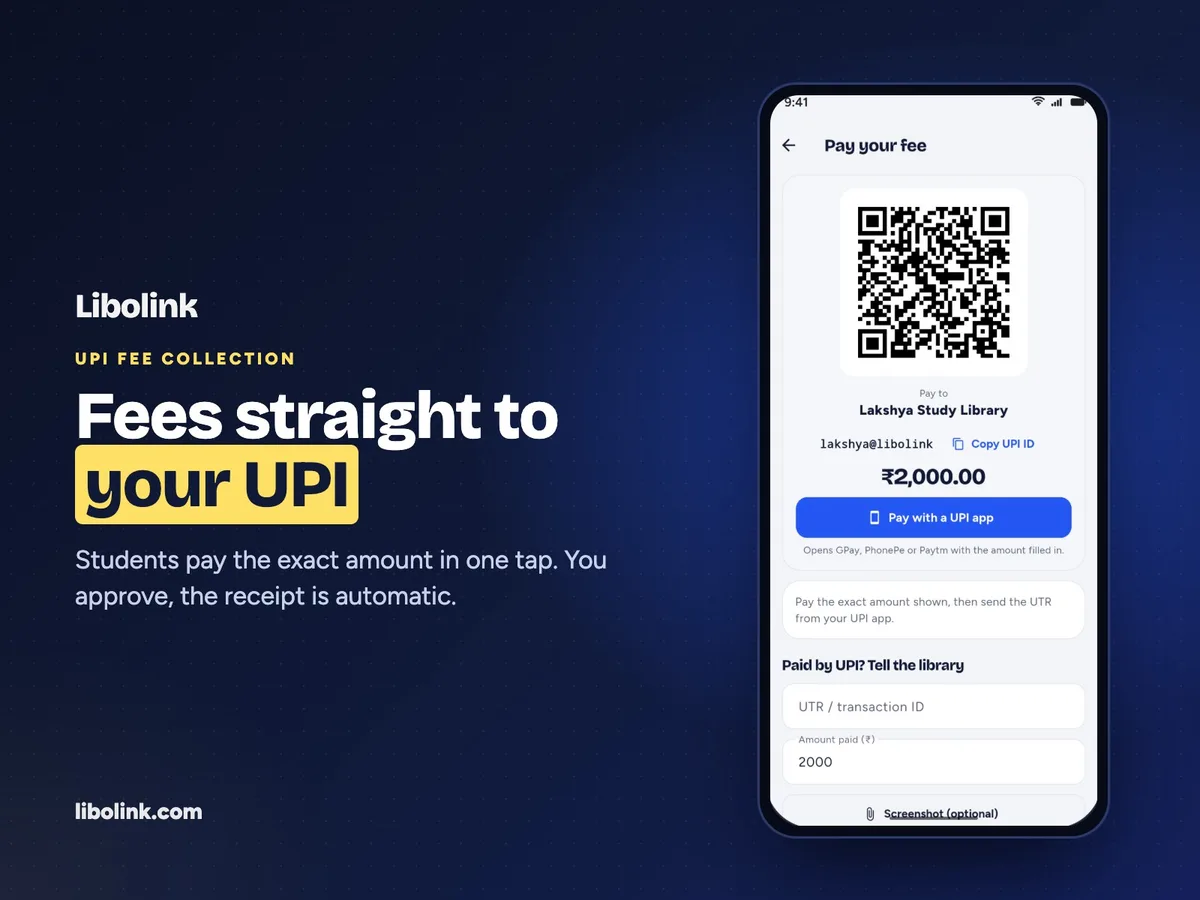
In Libolink you add your UPI ID or shop QR once. Students tap Pay now in their app, pay through any UPI app and submit the UTR. Staff match it in the bank app and approve, and the student gets a receipt automatically. Cash and counter payments are recorded in the same place with an instant receipt. The home screen lists fees due today and payments waiting to be verified, and fee reminders can go only to the students whose fees are due. Refunds are recorded against the payment. Online card and UPI checkout through Razorpay is optional. See all features or start a free trial.
Frequently asked questions
How do I verify a UPI payment from a student?
Ask for the 12-digit UTR (UPI transaction reference), then find a credit with the same UTR and amount in your own bank or UPI app. Mark the fee paid only once it matches. Do not rely on a screenshot alone, because screenshots can be edited.
Should a study library charge a late fee?
It is your choice. A clear grace period with a fixed late fee is easy to explain. Some libraries skip late fees and release the seat to the waitlist after the grace period instead. Either way, write the rule down and share it at admission.
Should library fees be due on a fixed date or from the joining date?
Both work. A fixed date is simpler to track. Joining-date cycles are fairer to students who join mid-month but need a daily list of who is due. Choose one and apply it to everyone.