

How to Manage Seats and Shifts in a Study Library
Key takeaways
- Capacity is seats × shifts. Full-day members use one seat in every shift.
- Number seats by zone (A1, A2, B1) so fees, seat changes and complaints stay clear.
- Check every new seat assignment against the same seat in the same shift to avoid double booking.
- Keep a waitlist when you are full, and release seats promptly when members leave.
- Write seat rules down: assigned seats, changing seats and leaving belongings.
Seats are what a study library sells. Getting seats and shifts right means more seats sold and fewer arguments at the desk.
Design your shifts
Shifts decide how many times each seat can be sold in a day. Common patterns:
| Pattern | Example timings | Works well when |
|---|---|---|
| Two shifts + full day | 7 am–2 pm, 2 pm–9 pm, full day 7 am–9 pm | Most students study half the day |
| Three shifts | 6 am–12 pm, 12 pm–6 pm, 6 pm–12 am | Long opening hours and high demand |
| Full day only | 8 am–10 pm | Small libraries, or exam-season crowds |
Look at local coaching timetables: students who attend morning classes want evening seats, and the other way round. You can start with two shifts and add a third when demand grows.
Number and group your seats
- Give every seat a short, permanent label, usually a zone letter and a number: A1–A30 in the AC hall, B1–B20 in the non-AC room.
- Group seats by zone when prices differ, for example AC and non-AC, or cabin and open desk.
- Put a number tag on each desk so students and staff use the same label.
- Mark seats that are broken, or next to a noisy door, as under maintenance instead of selling them.
Avoid double booking
Double booking happens when two students are given the same seat in the same shift, usually because the seat chart is on paper or in someone's head.
- Keep one seat chart per shift, not one for the whole day.
- A full-day member blocks the seat in every shift.
- Before assigning a seat, check that it is free in that shift for the whole membership period.
- When a student changes shift, release their old seat in the old shift.
Full-day members and seat changes
- Price full-day plans to reflect that the seat cannot be sold twice.
- Allow seat changes on request, but record each change with the date so the seat chart stays accurate.
- Decide whether students choose seats or are assigned one. Assigned seats reduce disputes.
When the library is full, run a waitlist
- Take the name, phone number and preferred shift of every student who wants a seat.
- When a seat opens, offer it to the first person on the waitlist and give them a deadline to confirm.
- Release seats held by students who have stopped coming and not renewed, once the grace period in your rules has passed.
A waitlist turns "come back later" into a real list of future members.
Seat rules to write down
- Each student uses only their assigned seat, in their own shift.
- Belongings are cleared at the end of the shift, unless the student has a locker or a full-day plan.
- Seats are released if fees stay unpaid after the grace period.
- Seat change requests go through the desk.
A full sample is in Study Library Rules for Students.
How Libolink handles seats
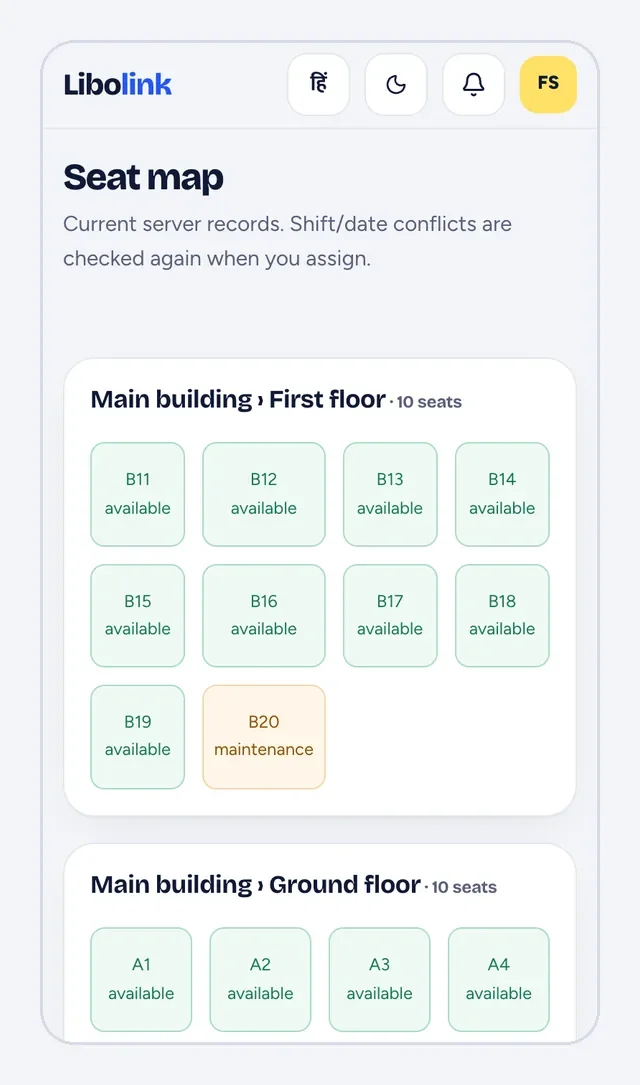
In Libolink you create shifts with their timings and capacity, and seats grouped by building, floor or room. The seat map shows at a glance which seats are free and which are taken. When you assign a seat, Libolink stops you if that seat is already taken in that shift, and broken seats can be set to maintenance. When the library is full, students go on a waitlist and can be admitted as soon as a seat opens. See how it works or start a free trial.
Frequently asked questions
How many shifts should a study library have?
Most libraries run two shifts with a full-day option, or three shorter shifts if they open long hours. Start with what nearby coaching timetables suggest, and add a shift when demand is clear.
How do I stop two students being given the same seat?
Keep a separate seat chart for each shift, block full-day members in every shift, and check that a seat is free for the whole membership period before assigning it. Library software can do this check automatically.
Should students choose their seats or be assigned one?
Assigned seats reduce disputes and keep the seat chart reliable. Many libraries let students request a seat and then assign it at the desk.