

Library Register Formats: Student, Fee, Seat and Enquiry Registers
Key takeaways
- Six registers cover a study library: students, fees, seats by shift, attendance, enquiries and expenses.
- Give every student a unique ID and use it in every register.
- Write the UPI UTR or cash receipt number against every fee entry.
- Keep a separate seat chart for each shift to avoid double booking.
- The same columns work in a notebook, an Excel sheet or library software.
Whether you use notebooks, Excel or software, a study library needs to keep the same information. The tables below show the columns for each register, with a sample row. All names and numbers are examples.
1. Student admission register
One row per student, filled in at admission.
| Student ID | Name | Phone | Guardian phone | Address | Preparing for | Joining date | Plan | Shift | Seat | ID proof seen |
|---|---|---|---|---|---|---|---|---|---|---|
| ST-0042 | Riya Verma | 98xxxxxx10 | 97xxxxxx22 | Near Civil Lines | SSC CGL | 01-10-2026 | Monthly | Morning | A12 | Yes |
- Give each student a unique ID and use it in every other register.
- Note which ID proof you checked, but avoid keeping photocopies you do not need.
2. Fee register
One row per payment.
| Receipt no. | Date | Student ID | Name | Period | Amount | Method | UTR / reference | Received by | Remarks |
|---|---|---|---|---|---|---|---|---|---|
| R-0310 | 03-10-2026 | ST-0042 | Riya Verma | Oct 2026 | ₹800 | UPI | 4271xxxxxx35 | Desk | Matched in bank |
- For UPI, write the 12-digit UTR, and mark it checked only after you find it in your bank app.
- For cash, the receipt number is the reference.
- Record a refund as its own row, linked to the original receipt number.
3. Seat chart by shift
Each row is a seat, with one column per shift.
| Seat | Zone | Morning (7 am–2 pm) | Evening (2 pm–9 pm) | Status |
|---|---|---|---|---|
| A12 | AC hall | ST-0042 Riya Verma | ST-0057 Aman Gupta | Occupied |
| A13 | AC hall | ST-0061 (full day) | ST-0061 (full day) | Occupied |
| A14 | AC hall | — | — | Free |
| B03 | Non-AC | — | — | Maintenance |
- A full-day member fills the seat in every shift.
- Update the chart the same day a student joins, changes seat or leaves.
4. Attendance register
| Date | Student ID | Name | Shift | In | Out | Marked by |
|---|---|---|---|---|---|---|
| 05-10-2026 | ST-0042 | Riya Verma | Morning | 7:05 am | 1:50 pm | Self |
5. Enquiry register
Every walk-in and phone call, even if they do not join that day.
| Date | Name | Phone | Source | Shift wanted | Stage | Next follow-up | Notes |
|---|---|---|---|---|---|---|---|
| 04-10-2026 | Karan Singh | 99xxxxxx48 | Evening | Visited | 07-10-2026 | Wants an AC seat |
Keep the stages simple: new, spoke, visited, joined, not interested.
6. Expense register
| Date | Category | Description | Amount | Paid by | Bill kept |
|---|---|---|---|---|---|
| 02-10-2026 | Electricity | September bill | ₹9,840 | UPI | Yes |
Monthly profit is fee income (after refunds) minus expenses. Without this register, profit is a guess.
Moving from registers to software
Registers work for a small library run by one person. As students, shifts and staff grow, it gets harder to keep several notebooks consistent. If you plan to move to software, copy your student register into an Excel sheet first: most software can import students from Excel, so you do not type every student again.
How Libolink fits
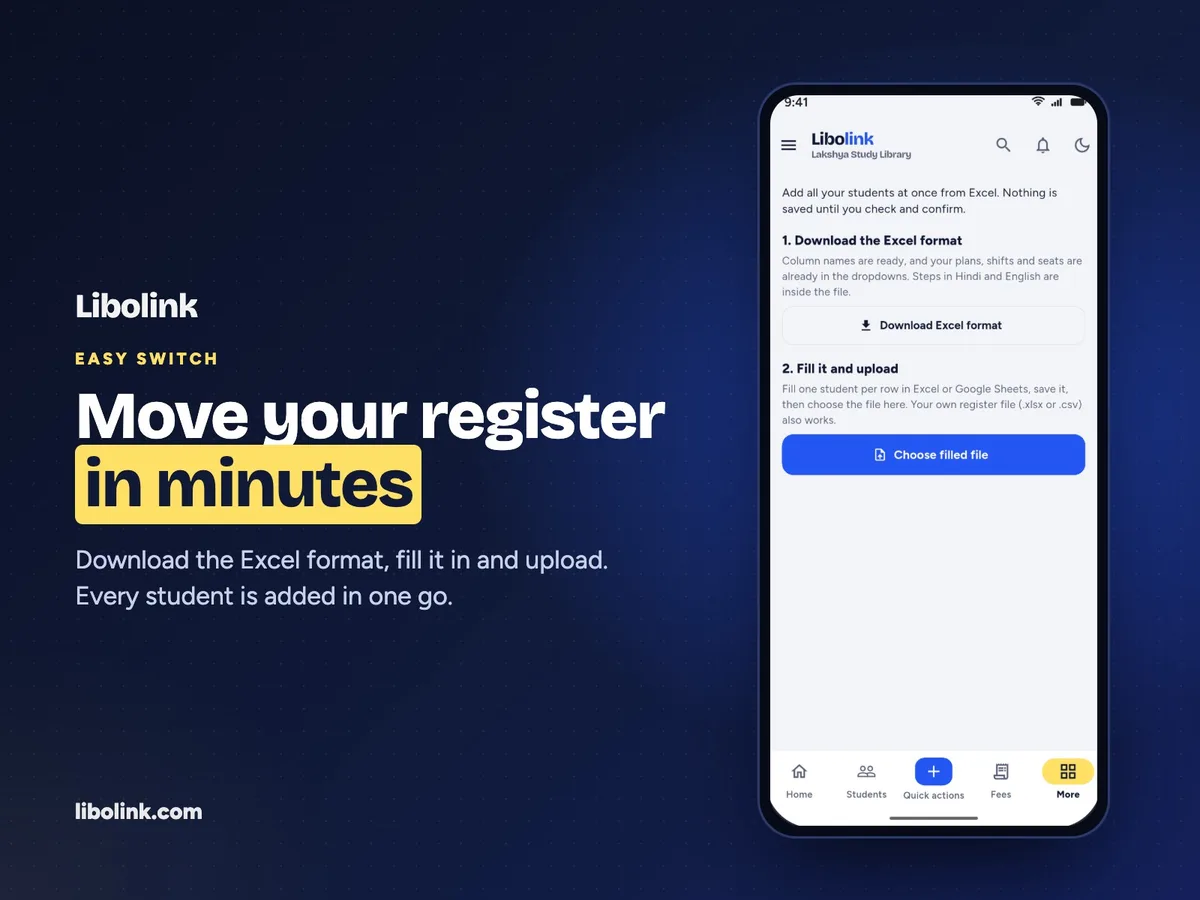
Libolink keeps all six registers in one place: students, payments with receipts, seat assignments per shift, attendance, leads and expenses. To move from paper or Excel, download Libolink's Excel format (it already lists your plans, shifts and seats, with instructions in Hindi), fill one row per student and upload it. Nothing is saved until you check and confirm, and every student gets their own login. Start a free trial or read the FAQ.
Frequently asked questions
What columns should a library fee register have?
Receipt number, date, student ID, name, period covered, amount, payment method, UPI UTR or cash reference, who received it, and remarks. Record refunds as separate rows linked to the original receipt.
How do I make a seat register for a study library?
List every seat with its zone, then the student assigned in each shift, and a status such as free, occupied or maintenance. Full-day members fill the seat in every shift.
Can I move my library register to Excel or an app?
Yes. Copy the student register into an Excel sheet with one row per student. Most library software, including Libolink, can import that sheet, so you do not type each student again.