

Sharing Study Material and Newspapers With Library Students
Key takeaways
- Students choose libraries for quiet and seats, but stay for extras: notes, the syllabus, previous papers and the daily newspaper.
- Share only what you have the right to share: your own notes, official syllabus and notices, free material whose terms allow it, and licensed subscriptions.
- Forwarding paid e-paper PDFs from Telegram groups breaks copyright law and can get a library into trouble. Do not do it.
- Organise material by exam and subject, and remove old newspapers automatically after a few days.
- Reading inside an app, with the student’s name on each page, discourages forwarding.
A student preparing for UPSC, SSC, banking or NEET spends hours a day at your library. Giving them useful material in the same place, and in an organised way, makes your library harder to leave. This guide covers what to share, what you are allowed to share, and how to do it without a pile of papers or a messy WhatsApp group.
What students actually want
Ask your students and the same list comes up:
- The syllabus for their exam, clearly divided by subject.
- Notes for each subject, especially short revision notes.
- Previous years' question papers.
- Current affairs: the daily newspaper and a monthly magazine.
- Self-help and motivation books for long preparation years.
- Library notices: holidays, timing changes, fee dates.
What you are allowed to share
Copyright law in India protects newspapers, magazines, books and coaching notes. A library can share:
- Material you created yourself, such as notes written by you or your staff.
- Official public documents, such as exam notifications and syllabus documents published by exam bodies.
- Free material whose terms allow sharing. Many government education portals publish textbooks free to read; check each site's terms before copying files.
- Material you have a licence for, such as an institutional or multi-user e-paper or magazine subscription that allows sharing with your members.
- Material a publisher or author has permitted you to share.
Do not share PDFs of paid newspapers, magazines or books downloaded from Telegram or WhatsApp groups. It is copying without permission, publishers do act against it, and it puts your library's name at risk. If you want newspapers for students, buy print copies for the reading table or ask the publisher about a library e-paper subscription.
Organise by exam and subject
A long list of files helps nobody. Keep the same structure every time:
| Category | Examples | How long to keep |
|---|---|---|
| Syllabus | UPSC prelims syllabus, SSC CGL syllabus | Until the exam changes |
| Notes | Polity chapter notes, Reasoning short tricks | Until updated |
| Previous papers | Last five years, by exam | Permanently |
| Newspapers | Today's licensed e-paper | 7 days |
| Magazines | Monthly current affairs | 3 months |
| Books | Self-help, biographies (licensed) | Permanently |
Add the exam name and subject to every file, so students can filter to what they need.
Make old newspapers disappear by themselves
Daily newspapers pile up fast: thirty files a month, most of them never opened after the first week. Set a rule that a newspaper is removed after a set number of days, for example seven. Your storage stays small and students always see the current issue first.
Reading inside an app instead of forwarding files
When files go to a WhatsApp group, they are forwarded within minutes and you lose track. Reading inside your library app is better for everyone:
- Students find everything in one place, by exam and subject.
- There is no download button, so files are not passed around as easily.
- The student's name on every page discourages screenshots and sharing.
- You see how many times each file was read, so you know what students value.
Doing it in Libolink
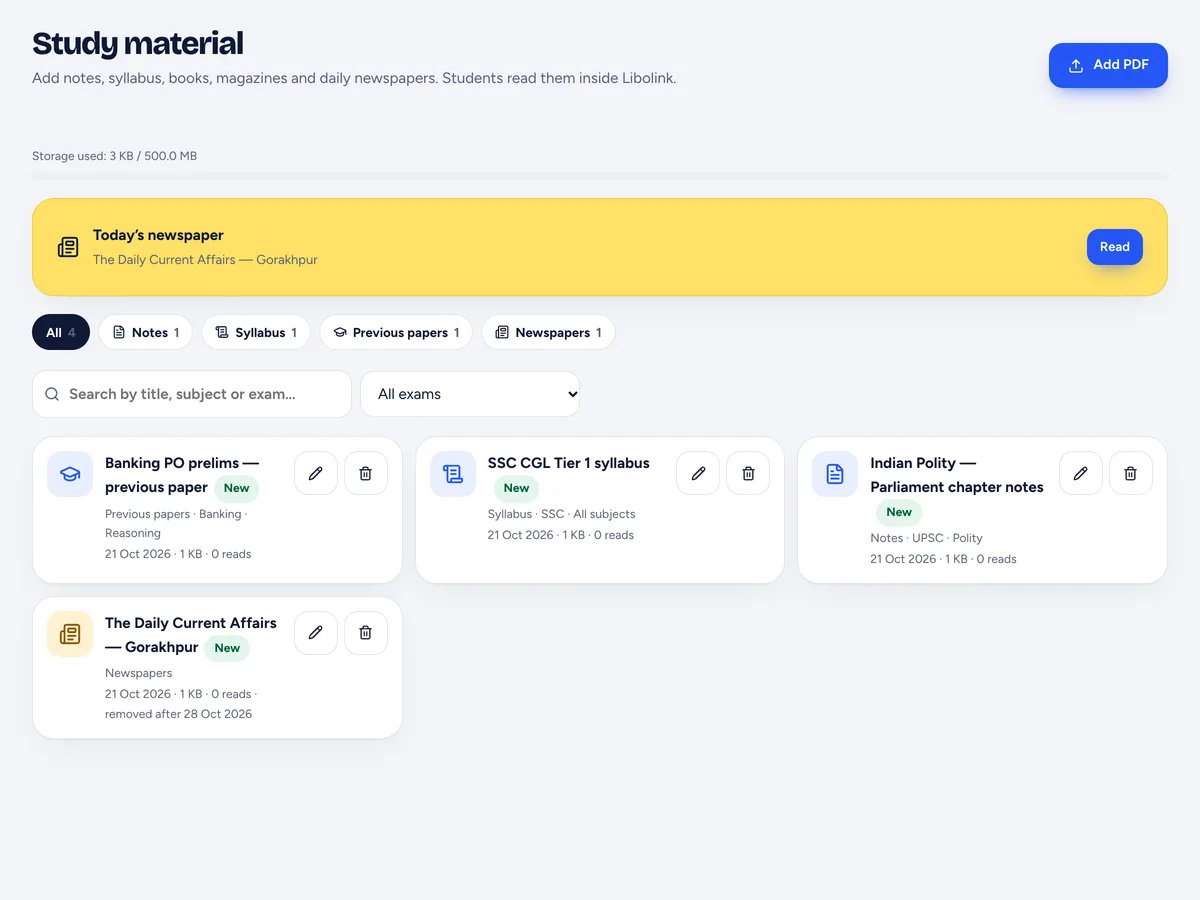
- Open Study material and tap Add PDF.
- Choose the category (notes, syllabus, previous papers, books, magazines or newspapers), add the title, exam and subject, and pick the PDF (up to 24 MB).
- For newspapers and magazines, choose when the file should be removed automatically, for example after 7 days.
- Leave Tell my students on for important notes; it sends them a notification. It is off by default for daily newspapers.
Students open Study material in their app, see today's newspaper at the top, filter by exam and read page by page inside Libolink with their name across the page. On Android, screenshots are blocked while a file is open. The files count towards your plan's storage.
Read How to Get More Students for Your Library for other ways to make your library the one students recommend.
Frequently asked questions
Can a library share newspaper PDFs with students?
Only if the library has the right to, for example a library or multi-user e-paper subscription that allows it. Forwarding paid e-paper PDFs from Telegram or WhatsApp groups is copying without permission.
What study material can a library share freely?
Notes you made yourself, official exam notifications and syllabus documents, free material whose terms allow sharing, and material you are licensed or permitted to share.
Can students download the PDFs in Libolink?
No. Students read study material inside the Libolink app or website, with their name on each page and no download button. On Android, screenshots are blocked while a file is open.
How do old newspapers get removed?
When you add a newspaper or magazine in Libolink you choose how many days to keep it. After that day it leaves the list and its file is deleted automatically.