

How to Fill Empty Seats When Students Are Absent or Leave Early
Key takeaways
- On most days 10–20% of booked seats sit empty because their students are absent or have gone home.
- Sell one seat twice: a morning student and an evening student can share a seat when the shift timings do not overlap.
- Give an absent student’s seat to someone else for the rest of the day only, and return it to them the next morning.
- Set clear rules first: the regular student keeps their seat, lockers stay private and the day seat ends at closing.
- A seat map that shows who is in the library right now makes these decisions in seconds instead of a walk around the hall.
A full library and a busy library are not the same thing. Your register may say every seat is taken, yet on a weekday afternoon a walk around the hall shows empty desks: students who are unwell, at college, at home for a festival, or who studied in the morning and left. This guide shows simple ways to use those seats without upsetting the students who pay for them.
Why seats sit empty in a "full" library
- Absence. Exams, illness, travel and festivals keep a share of students away on any given day.
- Early leavers. A full-day student may study from 7 AM to 2 PM and then go home.
- Shift gaps. A seat booked only for the morning shift is empty every evening unless someone else books it.
- Paused memberships. A student who went home for two weeks still holds a seat if nobody notices.
Counting these honestly is the first step. If your library has 60 seats and 8 are empty on an average afternoon, that is the space for 8 more evening students or several day passes.
Sell one seat twice with shifts
The simplest fix is a seat shared by two shifts. A morning student (for example 7 AM to 1 PM) and an evening student (2 PM to 9 PM) can use the same seat because their times never overlap.
| Seat | Morning 7–1 | Evening 2–9 | Full day |
|---|---|---|---|
| A1 | Asha | Ravi | — |
| A2 | — | — | Neha |
| A3 | Sameer | — | — |
In this example seat A3 has room for one evening student. Make sure your software checks shift timings when you give a seat, so nobody is ever given a seat that is already taken in overlapping hours. A full-day plan takes the seat in every shift.
Give an absent student's seat for one day
Sometimes a student without a fixed seat (a new admission, someone whose seat is under repair, or a day visitor with a plan) needs a place today. If a regular student has not come, or has already left for the day, you can give that seat to them for the rest of today only.
Good rules for a day seat:
- The regular student's seat is theirs again from the next morning, automatically.
- If the regular student arrives later the same day, they get priority; keep one spare seat for this.
- Lockers and belongings at the desk are never moved.
- The day student is told it is a one-day seat, so there is no argument later.
Use "who is in the library right now"
Deciding which seats are free should not need a walk around the hall. A good seat map shows each seat as one of:
- In library — the student checked in and has not left.
- Not in yet — the seat is booked but its student has not come today.
- Left for today — the student checked out; the seat is free for the rest of the day.
- Free — nobody holds the seat today.
With QR or staff check-in and check-out, this view is always current.
Doing it in Libolink
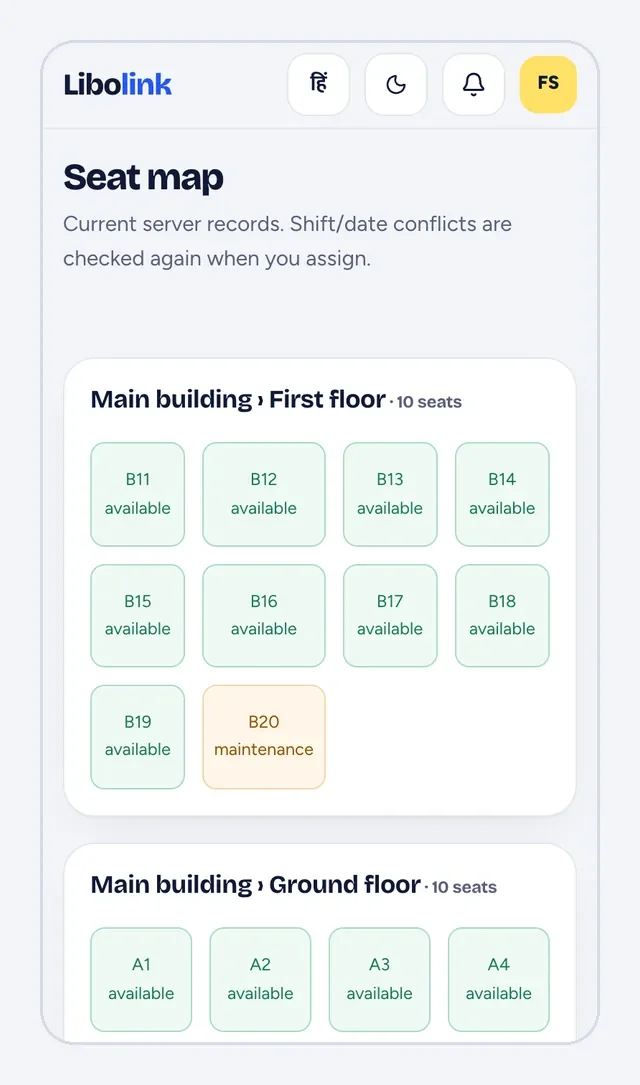
- Open Seats. The counts at the top show seats, free now, given and in library now. Use the chips to switch between Right now, Whole day and each shift, and between floors.
- Tap a seat to see who holds it in each shift, whether they are in the library, their plan and phone, with Call, WhatsApp, SMS and Send note buttons.
- For a student who is away or has left, tap Give for today and choose who sits there. The seat returns to its student tomorrow, and the day student gets a notification.
- Seat assignments lists students who have a plan but no seat, each with an Assign seat button that shows only free seats on the floor you pick.
Questions to settle with your students
- Tell every student, in your rules, that seats booked by shift may be used by others outside their shift.
- Decide whether a student who is absent for many days without notice keeps their seat. Pausing their membership keeps the fee fair and frees the seat.
- Put the day-seat rule on your notice board and in the app's Rules page, so it is never a surprise.
Read Library Seat and Shift Management for setting up shifts and seats from the start.
Frequently asked questions
Can two students share one library seat?
Yes, if their shifts do not overlap: for example a morning student from 7 AM to 1 PM and an evening student from 2 PM to 9 PM. A full-day student holds the seat in every shift.
Is it fair to give an absent student’s seat to someone else?
Yes, if it is only for that day, the regular student gets it back the next morning, their locker is untouched and the rule is written in your library rules.
How do I know which seats are free right now?
Use attendance with check-in and check-out. Libolink’s seat map then shows each seat as in library, not in yet, left for today or free.
What should I do with a student who has stopped coming?
Call or message them first. If they will be away for a while, pause their membership: the end date moves forward and the seat can be used meanwhile.