

Free Website and Enquiry Form for Your Study Library
Key takeaways
- Every library on Libolink gets its own website free: photos, facilities, timings, plans with prices, a map link, contacts and FAQs.
- You edit and publish it from the app, with your logo and colours. No web designer and no hosting bill.
- Its enquiry form asks for name, phone, exam, preferred plan and shift, and every enquiry lands straight on your Leads board.
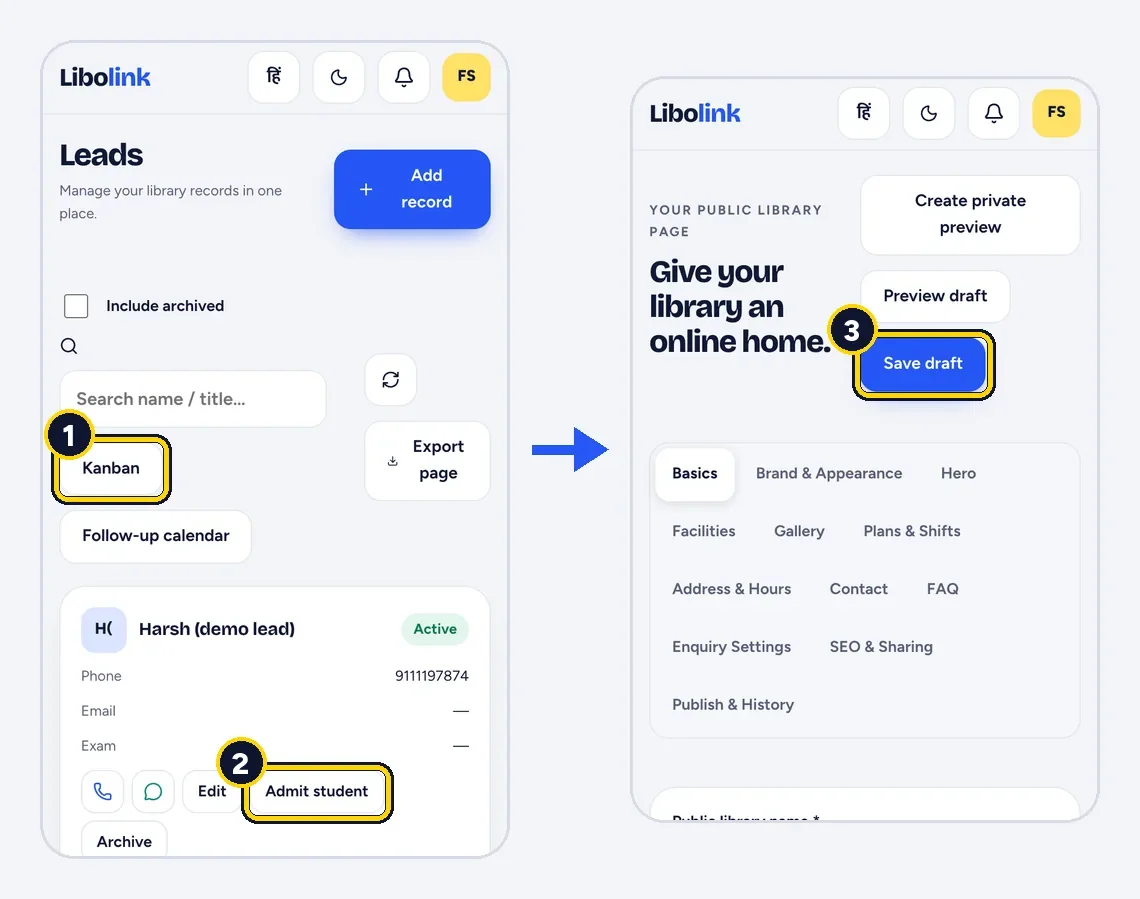
- You and your staff get a notification for each new enquiry, and Admit student turns it into a student with the details filled in.
- The page is built for Google and WhatsApp: its own search title, share preview and QR poster.
Students looking for a library search on Google and ask friends on WhatsApp. If all you have is a phone number on a banner, you lose them to the library that has photos, prices and a form. A website used to mean a designer, a domain and a hosting bill. With Libolink, it is included.
A website for your library, at no extra cost
Every Libolink library can publish its own page at libolink.com/l/your-library-name. You fill it in from the app, section by section:
- Headline and description: what makes your library worth joining.
- Photos: real photos of your reading hall, cabins and facilities.
- Facilities: AC, Wi-Fi, lockers, RO water, power backup, whatever you actually offer.
- Plans and shifts: taken from your real membership plans, so prices on the page are always the ones you charge.
- Address and hours, with a Google Maps link.
- Contacts: a phone number, email and WhatsApp number you choose to show.
- FAQs: your own questions and answers, such as "Is there a girls' section?"
- Your logo and colours.
Choose which sections to show and in what order, save a draft, check it, and publish. Every published version is kept, so you can go back.
Already have a designed page?
If someone has already made an HTML page for your library, upload the file or paste the code. Show it as a button on your Libolink page, or instead of the standard page. The enquiry form and Student Login stay on Libolink's own page, so they keep working.
An enquiry form that lands in your app
Your page has an Enquire form that asks for:
| Field | Why it helps |
|---|---|
| Name and phone | So you can call back |
| Email (optional) | For students who prefer it |
| Exam preparing for | UPSC, SSC, banking, NEET: know what they need |
| Preferred plan | Taken from your real plans |
| Preferred shift | Morning, evening or full day |
| Message | Anything else they want to ask |
When a student sends it, three things happen:
- The enquiry appears on your Leads board with all these details. Nothing goes to a separate inbox or a lost notebook.
- You, and any staff allowed to handle leads, get a New library enquiry notification.
- The student gets a reference number, so they know it was received.
When you switch on online booking, your page also shows Book a seat online and a Book this plan online button on each plan, so a student can pick a free seat and pay without waiting for a call back. See Online Seat Booking for Study Libraries.
From enquiry to admission in one step
On the Leads board, each enquiry moves through stages as you call, invite for a visit and follow up, with a next follow-up date so nobody is forgotten. When the student joins, tap Admit student: their name, phone and preferences are already filled in, so the desk only adds the seat, plan and first payment. Business analytics shows how many enquiries became students.
Built to be found and shared
- Google: set your own search title and description, and allow indexing. The page tells Google it is a library, with its plans and FAQs, in a form search engines read. Add the link to your Google Business Profile; see How to Set Up a Google Business Profile for Your Library.
- WhatsApp: share the link and it shows a preview card with your library's name and photo.
- Posters: create a QR poster for your link and print it for the gate, notice boards and coaching centres nearby.
- Directory: choose to be listed in the Libolink library directory, where students search by city.
- Student Login is on every page, so your own students use the same link.
What it costs
Nothing extra. The website, the enquiry form and the Leads board are part of the same Libolink plan as your seats and fees, including during the 30-day free trial. Your page lives on Libolink's address; there is no domain or hosting to buy.
For more ways to bring in students, read How to Get More Students for Your Library. To build your page now, start your free trial. No card is needed.
Frequently asked questions
Does Libolink give my library a free website?
Yes. Every library can publish its own page with photos, facilities, timings, plans with prices, a map link, contacts, FAQs and an enquiry form, at no extra cost.
Where do enquiries from my library website go?
Straight to the Leads board in your Libolink app, with the student's name, phone, exam, preferred plan and shift. You and your lead staff get a notification for each one.
Can I turn an enquiry into a student?
Yes. Tap Admit student and the enquiry's details are filled in, so you only add the seat, plan and payment.
Can I use my own website design?
Yes. Upload your HTML page and show it as a button on your Libolink page or instead of it. The enquiry form and Student Login stay on Libolink's page.
Does an enquiry book a seat?
No. An enquiry creates a lead for your library to follow up. Seats and student accounts are created only when your staff admit the student.