

Girls Section in a Study Library: Seats, Safety and Bookings
Key takeaways
- A separate, well-lit girls section is one of the strongest reasons parents choose a study library for their daughters.
- Plan it by floor or room, near the entrance and staff desk, with its own clear rules.
- Keep a parent or guardian contact for every student under 18.
- In Libolink, mark a floor or room as girls only in one tap; girls-only seats show in pink and online bookings offer them only to girls.
In many towns, parents decide whether their daughter can join a study library after one visit. What they look for is simple: a separate place to sit, good light, staff they can call, and a library that knows who is inside. A well-run girls section answers all of that, and it fills seats that might otherwise stay empty.
This guide covers how to plan the section, the house rules that matter, and how to manage it in Libolink.
Why a girls section brings more admissions
- Parents feel safe. A separate area, visible staff and a library that records who comes in and out reassures families, especially for evening shifts.
- Students study better. Many girls prefer a quieter section where they are not the only girl in a row of boys.
- It is easy to explain. "We have a separate girls section" is one line on a poster, your WhatsApp status and your website, and it is a question parents often ask on the phone.
Choosing the space
- A whole floor or room is best. Splitting one room down the middle is harder to keep separate.
- Close to the entrance and the staff desk, not at the far end of the building.
- Good light, working fans or AC, charging points and clean washrooms nearby.
- Size it to demand. Start with the share of girls in your current enquiries, then grow it. Empty girls-only seats can be opened to everyone again in one tap.
House rules that matter
- Entry by QR check-in for everyone, so you always know who is inside.
- Visitors meet students at the desk, not inside the section.
- CCTV in common areas and the entrance; never inside washrooms.
- A female staff member or a trusted staff contact on evening shifts, if you can.
- A clear complaint route: students can raise a complaint in the app, and you see it at once.
Write these rules in your library rules, and add them to the booking terms students accept when they book online.
Students under 18
- Keep a parent or guardian's name and phone number for every student under 18.
- Call the guardian before confirming admission if your library asks for guardian consent.
- In Libolink, online bookings from students under 18 must include a guardian's name and mobile, are never approved automatically, and, if your library asks for guardian consent, approval needs a note on how the guardian agreed.
Managing the section in Libolink
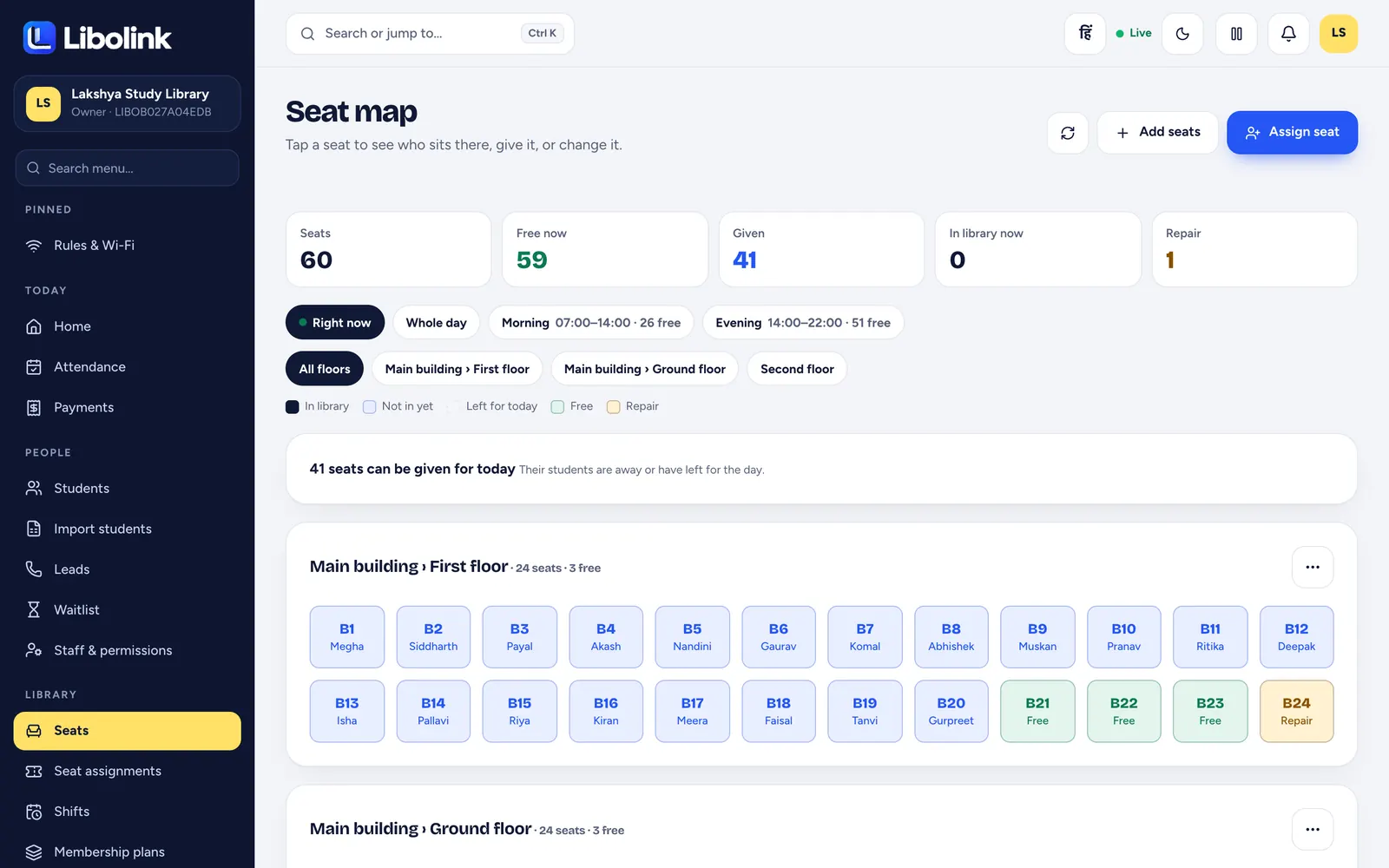
- Open People → Online booking → Link, QR & settings and go to Girls and boys sections.
- Next to the floor or room, choose Girls only (or Boys only). Every seat there changes at once. You can also change single seats in the seat list.
- On the seat map, girls-only seats show in pink with a ♀ mark, so staff see the section at a glance.
- On your online booking page, a student first says if they are a girl, a boy or other, and then sees only the seats open to them.
- Because students state their gender themselves, automatic approval skips girls-only and boys-only seats unless you allow it, so your staff can check at the desk.
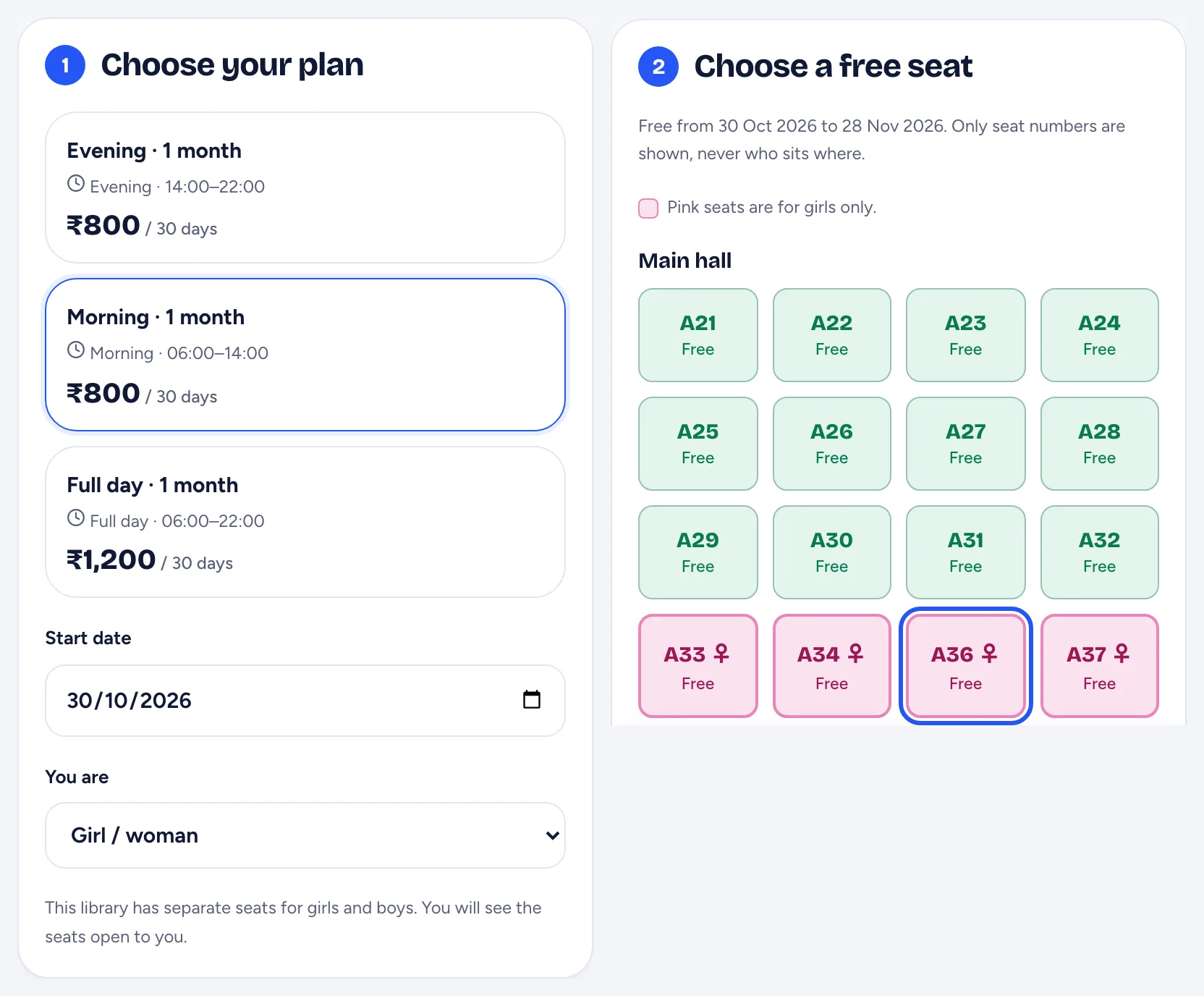
The public never sees who sits where: the booking page shows seat numbers only.
Telling families about it
- Put "Separate girls section" on your QR poster and website, with a photo of the section.
- Mention it in your Google Business Profile description.
- Invite parents to visit before admission. A short visit often decides it.
A girls section is not only about safety; it is about trust. Libraries that earn it get word-of-mouth admissions that no advertisement can buy. To see the whole booking flow, read Online Seat Booking for Study Libraries.
Frequently asked questions
How do I make a girls-only section in Libolink?
Open Online booking, then Link, QR & settings, and choose Girls only next to the floor or room. All its seats change at once; you can also change single seats in the seat list.
Can boys book a girls-only seat online?
No. On the booking page a student says if they are a girl, a boy or other, and sees only the seats open to them. Because this is self-declared, automatic approval skips girls-only seats unless you allow it.
How do girls-only seats look on the seat map?
They show in pink with a ♀ mark. A free girls-only seat is filled pink; a seat already given keeps its state colour with a pink border.
What should I keep for students under 18?
A parent or guardian name and phone number. Libolink asks for both on online bookings from students under 18 and never approves those bookings automatically.