

Library Fee Collection Without Commission: UPI and Online Payments
Key takeaways
- Libolink never takes a cut of your fees. Students pay you, not Libolink.
- Direct UPI: students pay your own UPI ID or QR from the app, so the full amount reaches your bank with no gateway and no commission.
- Automatic online payments: connect your own Razorpay account and payments confirm themselves, with the receipt created instantly. Only Razorpay's own fee applies.
- You choose per library: direct UPI only, online only, or both. Cash at the counter is always recorded in the same place.
- Every payment, by any method, ends in the same record and the same receipt, so your fee figures stay correct.
Every rupee a study library loses to commission or to a missed fee comes straight out of profit. Libolink gives you two ways to collect fees, and you pick the one that suits your library: direct UPI, where nobody takes a cut, or fully automatic online payments through your own payment account.
Libolink takes no commission
First, the simple part. Libolink is a monthly subscription for the library. It does not take a percentage of student fees, it does not hold your money, and it does not sit between the student and your bank. Students pay their fees to your library directly, and Libolink records the payment.
Option 1: direct UPI from the app, with zero commission
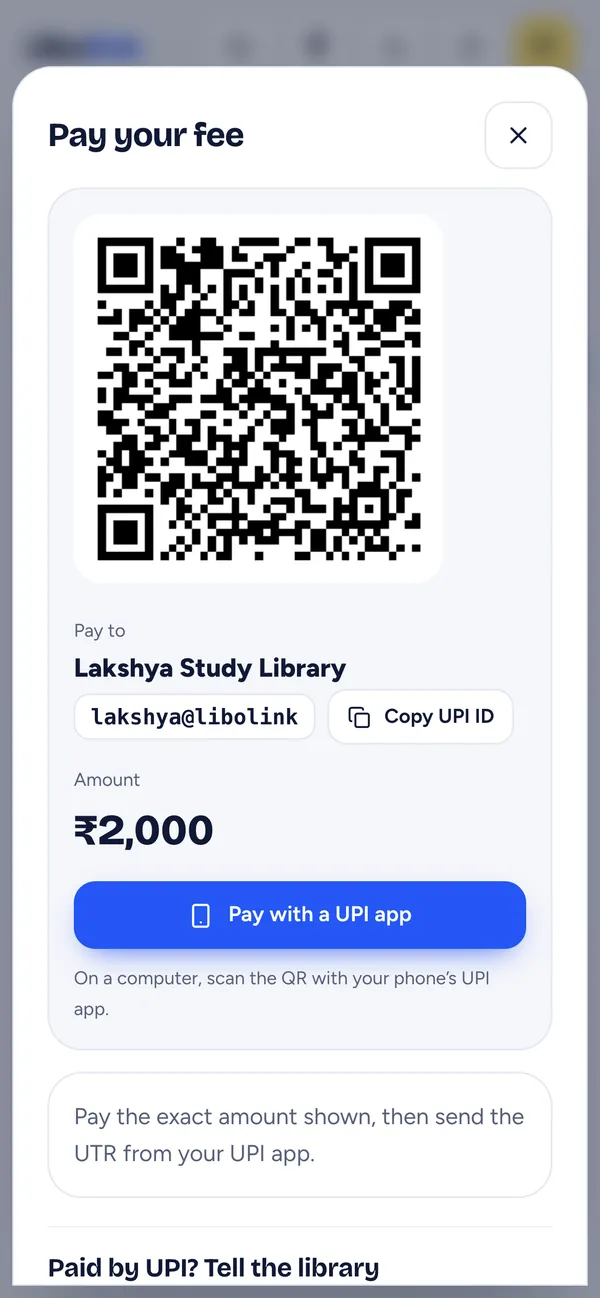
This is the option most libraries start with, and the one that saves the most money.
- Add your UPI ID or shop QR once in Libolink.
- A student opens their fee in the Libolink app and taps Pay with a UPI app. On Android every installed UPI app is offered; on iPhone, GPay, PhonePe, Paytm and others are listed. On a computer, they scan the QR.
- The exact amount due is filled in, so there is no "I paid ₹50 less by mistake".
- The student sends the UTR (the 12-digit UPI reference) from the app.
- You or your staff match the UTR in your bank app and tap Approve. The receipt reaches the student automatically.
Because the money goes from the student's UPI app straight to your UPI ID, there is no payment gateway in between and no commission on any amount. Students who have nothing due can still find your UPI ID and QR on their Fees page.
Checking many UPI payments at once
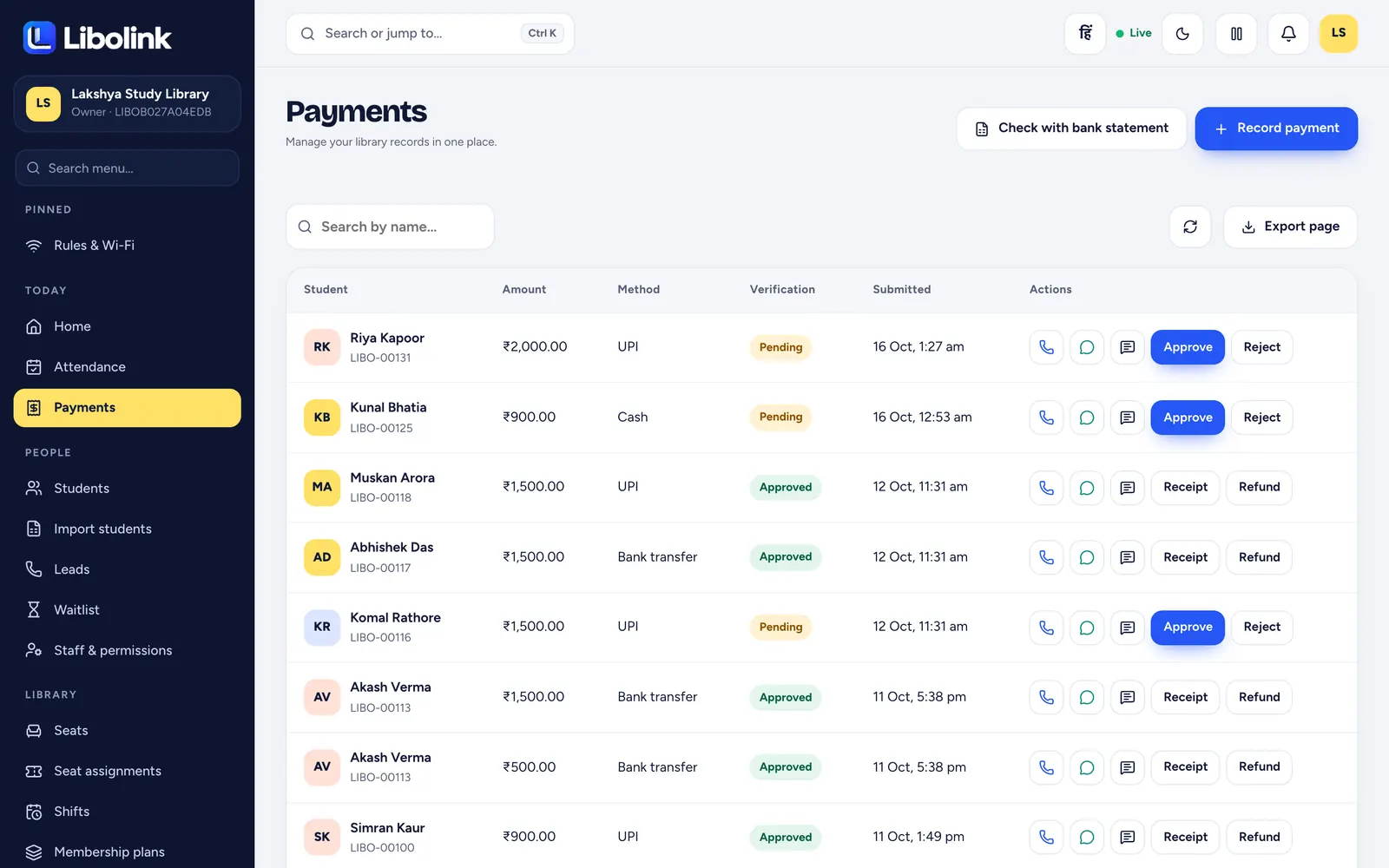
If many students pay on the same day, use Check with bank statement on the Payments screen. Download your statement from your bank as an Excel or CSV file, upload it, and Libolink matches the UTRs and amounts for you, so you approve the matching payments together instead of one by one.
Option 2: automatic online payments
Some owners would rather not check UTRs at all. For them, Libolink connects to your own Razorpay account:
- The student taps Pay online and pays by UPI, card or netbanking on Razorpay's secure page.
- Razorpay confirms the payment to Libolink, and the receipt is created automatically. Nobody has to approve anything.
- The money settles into your own Razorpay account, then your bank. Libolink never touches it.
- Your secret keys are stored encrypted and are never shown again.
Razorpay charges its own fee on each online payment, as every payment gateway does. Libolink adds nothing on top. Check Razorpay's current pricing before you switch it on.
Which one should you use?
| Direct UPI | Automatic online (Razorpay) | Cash at the counter | |
|---|---|---|---|
| Commission | None | Razorpay's own fee only | None |
| Who confirms | You approve after matching the UTR | Confirmed automatically | Staff record it on the spot |
| Receipt | Automatic after approval | Automatic and instant | Instant |
| Best for | Saving every rupee | Busy libraries, many payments a day | Students who pay in cash |
You can switch on both. In the payment settings choose Manual only, Manual and online (students pick), or Online only. Staff can always record cash, cheque or bank transfers at the desk, whichever you choose.
The same record, whichever way they pay
- One fee record per student, with every payment and receipt in it.
- A student can pay several months together; Libolink settles the oldest month first.
- Refunds are recorded against the original payment, so your revenue stays accurate.
- The home screen shows fees due today and payments waiting for your check.
- Business analytics totals fee revenue, expenses, estimated profit and fees still to collect.
Fewer missed fees, too
Saving commission matters, but the bigger leak in most libraries is fees that are simply forgotten. Libolink reminds every student automatically, 7, 3 and 1 days before the due date, on the day and after it, and can follow up on WhatsApp if they ignore the app. How 7-3-1 fee reminders work explains the schedule. For the method behind checking payments, see How to Collect Library Fees by UPI and Cash.
Start your free 30-day trial. No card is needed, and you can set up your UPI ID in a minute.
Frequently asked questions
Does Libolink take a commission on library fees?
No. Libolink charges the library a subscription and takes no percentage of student fees. With direct UPI, the full amount reaches your bank. With online payments, only your payment gateway's own fee applies.
Can students pay library fees from the app without a payment gateway?
Yes. Students tap Pay with a UPI app, pay your own UPI ID or QR with the exact amount filled in, and send the UTR. You approve after matching it, and the receipt is automatic.
Can fee payments be confirmed automatically?
Yes. Connect your own Razorpay account and online payments are confirmed by Razorpay, with the receipt created instantly and no manual approval.
Can I still accept cash?
Yes. Staff record cash, cheque or bank payments at the counter in the same fee record, and the student gets an instant receipt.