

Run Your Library on Autopilot: What Libolink Does by Itself
Key takeaways
- Running a library on autopilot means the repeated daily jobs happen by themselves, and you only make the decisions.
- Libolink sends fee and renewal reminders 7, 3 and 1 days before the date, on the day and after, and stops the moment a student pays.
- Students who ignore the app get the same reminder on WhatsApp, from Libolink's own number with a monthly allowance included, or from your own number.
- Every morning from 8 AM you get one summary: fees due, plans ending, absent students, free seats and payments to check.
- Students can book a seat, pay, renew and pay months in advance from their phone, and forgotten check-outs close themselves at closing time.
- You keep the decisions that need a person: prices, refunds, students under 18, cash and which seats to release.
Most library owners do the same jobs every day: check who has paid, message the ones who have not, write receipts, see who is renewing, look for free seats, answer "is a seat free?" on the phone, and close the attendance register at night. None of it is hard, but it never stops, and it all falls on you when the desk person is on leave.
Libolink takes those repeated jobs off your hands. Once it is set up, the routine runs by itself every day, even when you are away, and your phone tells you only what needs a decision. That is what we mean by running your library on autopilot.
What autopilot means for a library
Autopilot does not mean nobody looks after the library. A pilot still flies the plane; autopilot only holds the course. In the same way:
- Libolink does the routine: reminders, receipts, check-outs, renewal warnings, booking requests, the daily summary.
- You make the decisions: prices and offers, refunds, students under 18, cash, complaints, and which seats to release.
The aim is simple. Instead of an hour of desk work every day, you spend a few minutes reading one summary and acting on the few things it lists.
What runs by itself, every day
| Job | What Libolink does without you |
|---|---|
| Morning check | Sends you one summary from 8 AM: fees due and the total, plans ending this week, students absent 3 or more days, free seats, students without a seat and payments to check |
| Fee reminders | Reminds each student 7, 3 and 1 days before the due date, on the day, and 1 and 7 days after, with their own amount |
| Renewal reminders | The same 7-3-1 schedule before a plan ends, so renewals come in before seats go empty |
| WhatsApp follow-up | If a student has not opened the app reminder in a day, or has no app, the same reminder goes on WhatsApp |
| Stopping reminders | Stops all reminders the moment the fee is paid or the plan is renewed |
| Receipts | Creates a numbered receipt for every payment the moment it is confirmed |
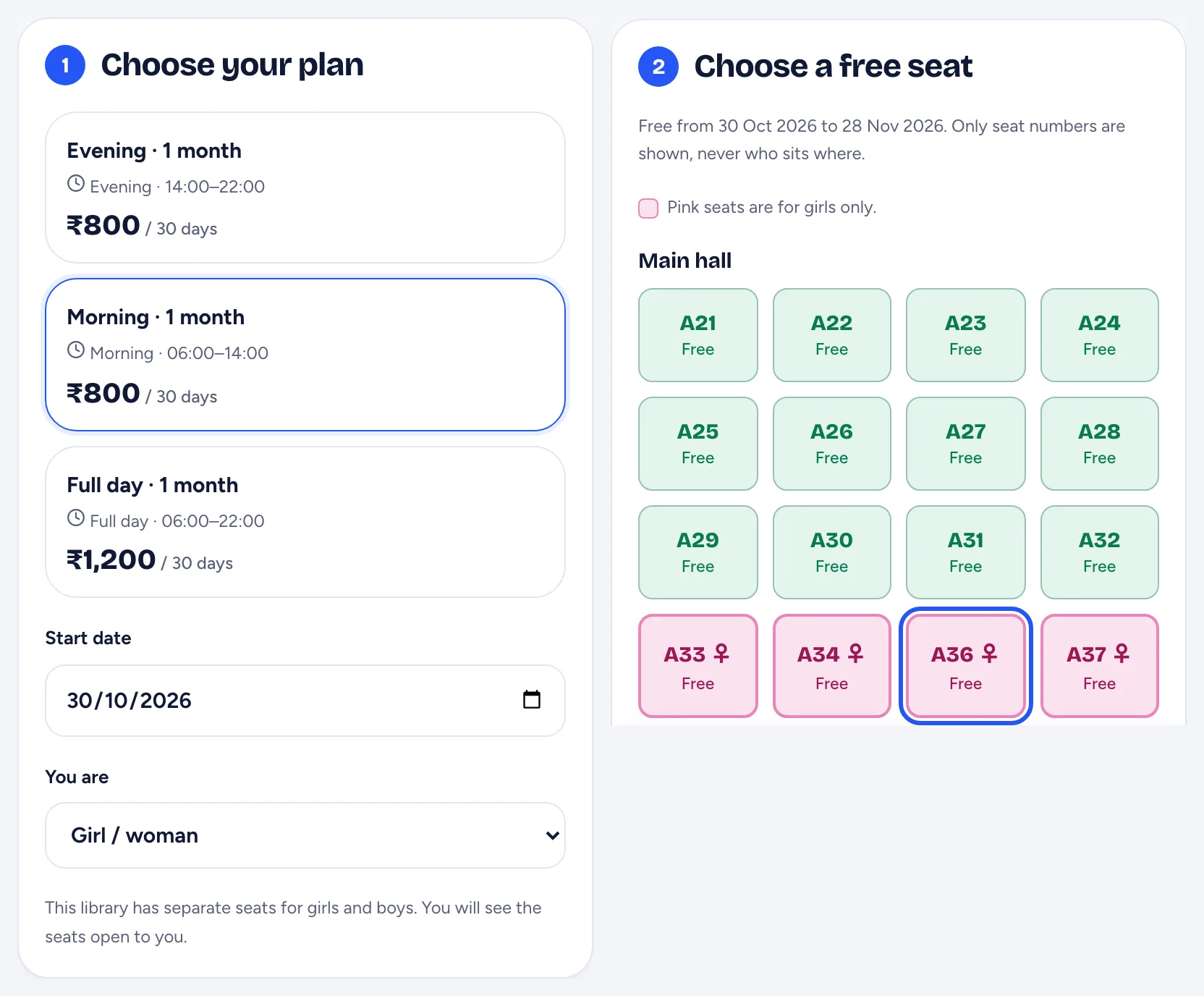
| New admissions | Takes seat bookings from your QR poster or link, and can approve them automatically once paid online |
| Student login | Shows the new student their Student ID and a set-password link, and also sends the link by email and on WhatsApp when set up |
| Renewals | Lets students renew in the app and pay 1 to 12 terms in advance; their seat continues if it is free |
| Seats after a plan ends | Keeps the seat with the student, shown as Plan ended on the seat map, until you renew or release it |
| Forgotten check-outs | Checks out visits left open at closing time, so attendance and the seat map stay right |
| Fee notices | Fills each student's own amount, months, due date and your UPI ID into a fee notice sent to many students |
| Enquiries | Puts every enquiry from your free library website on your Leads board, with a notification |
| Small things | Tells you about birthdays in your library and when someone joins the waitlist |
You set due dates and plans once, when you add a student. From then on, all of this repeats every day on its own.
A day on autopilot
8 AM. Your phone shows the daily summary, for example: 6 fees due, ₹4,800 in total, 3 plans ending this week, 2 students absent for 3 days, 4 seats free. On a day with nothing to report, nothing is sent.
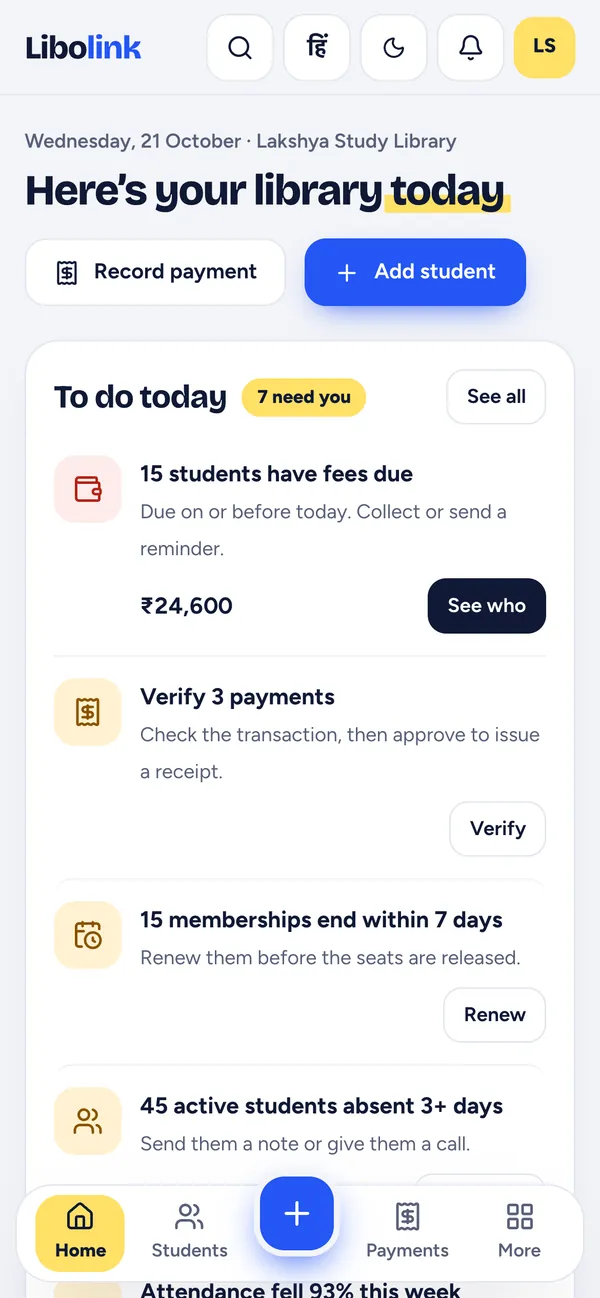
Through the day. Reminders reach the students who owe fees, in Hindi or English, at sensible hours. Students pay your UPI ID or online, and each payment gets a receipt. A new student scans your poster, picks a free seat and pays; with automatic approval, the student, plan and seat are created at once. Someone whose plan ends this week taps Renew in the app and pays for three months.
Evening. You open To do today for the few things left: a payment to check against your bank, a student to call, a seat to release. Tap See who on any line to get the list with Call, WhatsApp, Send note and Collect fee buttons.
Closing time. Anyone who forgot to check out is checked out automatically, so tomorrow's seat map starts clean.
WhatsApp reminders, now included with Libolink
From 14 November 2026, Libolink can send WhatsApp reminders from its own number. You do not need a Meta account, a business number or message templates. Choose Included with Libolink in WhatsApp reminders, tick the consent box, and switch it on.
- A monthly allowance of messages comes with your plan, and you can buy extra packs if you ever need more.
- App first: a reminder goes on WhatsApp only if the student has not read it in the app within a day, or has no app, so your allowance lasts.
- Choose key days (3 days before and on the due date) or every reminder day.
- Messages go only between 9 AM and 8 PM library time, and never to a student who has paid.
- The fee reminder carries the student's name, total due, plan and months, due date and your UPI ID, in English or Hindi.
- You see whether each message was delivered and seen.
Prefer your own number? Connect your library's WhatsApp Business number instead, and messages come from you, billed to you by Meta. Libolink adds no charge on top. See 7-3-1 Fee Reminders.
Switch on autopilot in 6 steps
- Add your seats, plans and students in Quick setup, or import them from Excel. Each student gets a due date, which starts the reminders.
- Add your UPI ID in Fee collection, so every reminder and notice shows where to pay. Connect your own Razorpay account if you want online payments that confirm themselves.
- Switch on WhatsApp reminders, either Included with Libolink or your own number.
- Take online bookings: in Online booking, open Link, QR & settings, tick Take online bookings, and choose who approves them. Approve automatically when paid online is the usual autopilot choice.
- Keep Students can renew themselves in the app ticked (it is on by default), so renewals and advance payments need no desk.
- Print the QR poster for your gate, and share your library page link on WhatsApp and Google.
During the free trial, Libolink also reminds you of any setup step you have missed, such as adding seats or your UPI ID.
What stays with you
Autopilot handles the routine, not your judgement. These stay with you, and most take a minute from your phone:
- Prices, plans and offers. Libolink never changes a price on its own.
- UPI payments made outside Razorpay. A student's UPI payment waits for you to check it; Check with bank statement in Payments matches many at once.
- Students under 18. Their bookings always wait for you, because a guardian must agree.
- Seats after a plan ends. The seat stays with the student until you renew the plan, mark the student as left, or release the seat. Home lists everyone whose plan ended and was not renewed, and you can renew them together.
- Refunds, cash and complaints. Complaints come to you as notifications; refunds and cash are recorded by you or your staff.
Manual register or autopilot?
| Job | With a register and WhatsApp by hand | With Libolink on autopilot |
|---|---|---|
| Finding who owes fees | Turning pages every evening | One line in the 8 AM summary |
| Reminding them | One message at a time, if you remember | 7-3-1 reminders to every student, every day |
| Students who ignore reminders | Calls and awkward talks | WhatsApp follow-up, then a short list for you |
| Renewals | Noticed after the seat goes empty | Warned 7 days ahead; students renew in the app |
| New admissions | Only when someone is at the desk | Booking and payment from a QR poster, at any hour |
| Receipts | Written by hand, easy to lose | Numbered receipt for every payment |
| When you are away | Work piles up | The routine keeps running |
Who autopilot helps most
- Owners with a job or another business, who visit the library once a day.
- Owners with a second branch, who cannot sit at two desks. See Multi-Branch Library Software.
- Small libraries that cannot pay a full-time desk person. See Run a Study Library Without Desk Staff.
- Busy libraries, where 150 students mean 150 due dates to track.
Set it up with free help
Every library on Libolink, including during the 30-day free trial, gets free setup help and staff training by phone, WhatsApp or video call, in Hindi or English. We can switch on autopilot with you in one call: email info@libolink.com or call 9170055568. To try it with your own students, start your free trial. No card is needed.
Frequently asked questions
Can I run my library on autopilot with Libolink?
Yes, for the daily routine. Libolink sends fee and renewal reminders, follows up on WhatsApp, creates receipts, takes seat bookings, lets students renew and pay in advance, checks out forgotten visits and sends you a summary every morning. You keep the decisions: prices, refunds, cash, students under 18 and releasing seats.
Does Libolink send fee reminders automatically?
Yes. Every student with a fee due is reminded 7, 3 and 1 days before the due date, on the day, and 1 and 7 days after, in the app and as a phone notification. Reminders stop as soon as the fee is paid.
Do I need my own WhatsApp Business number for reminders?
No. Since 14 November 2026, Libolink can send WhatsApp reminders from its own number, with a monthly allowance included in your plan and extra packs if you need more. You can still connect your own number if you prefer.
What is in the 8 AM daily summary?
Fees due and the total amount, plans ending within 7 days, students absent for 3 or more days, free seats, students without a seat and payments waiting to be checked. Nothing is sent on a day with nothing to report.
Does Libolink renew memberships or charge students automatically?
No. Libolink never charges a student by itself. It reminds students before the plan ends, lets them renew and pay in the app if you allow it, and lists students whose plans ended so you can renew them together in one go.
How long does it take to set up?
You can be running in an afternoon: add seats, plans and students (or import from Excel), add your UPI ID, and switch on WhatsApp reminders and online booking. Free setup help is available on phone, WhatsApp or video call.