

Library Registration Form Format for Students (Free Sample)
Key takeaways
- Fill one registration form for every student on the day they join, before they get a seat.
- Keep it to one page: student and guardian details, ID seen, plan, shift, seat, fees, deposit, and a signed promise to follow the rules.
- For students under 18, always take a parent or guardian's name, phone and signature.
- Ask only for what you need, say why you need it, and keep the forms locked away. Note which ID you saw instead of keeping photocopies you do not need.
- Give every form a number and use it as the student ID in your fee, seat and attendance records.
The registration form (also called the admission or membership form) is the first record of every student. It tells you who is sitting in your library, how to reach their family, what they paid for and that they agreed to your rules. When there is a fee dispute, a lost phone or an emergency, it is the paper you reach for.
What the form should include
| Section | Fields | Why |
|---|---|---|
| Form details | Form number (student ID), date of joining | Links the form to fee, seat and attendance records |
| Student | Full name, photo, date of birth, gender | Identifies the student; age decides whether a guardian must sign |
| Contact | Mobile number, WhatsApp number, email, current address | Reminders, receipts and emergencies |
| Guardian | Name, relation, mobile number | Emergencies, and required for students under 18 |
| ID seen | Type of ID (Aadhaar, college ID, driving licence) and last 4 digits | Proves identity without keeping copies |
| Study goal | Exam or course (UPSC, SSC, NEET, university), college or coaching | Helps you plan zones and offers |
| Plan and seat | Plan, shift, start date, end date, seat number, AC or non-AC, locker | What the student paid for |
| Fees | Fee amount, admission fee, discount, payment method, receipt number | The money record |
| Deposit | Security deposit amount and refund rules | Avoids disputes when they leave |
| Rules | "I have read and will follow the library rules" | Their agreement in writing |
| Consent | Messages on WhatsApp and SMS, CCTV in the library | Clear permission |
| Signatures | Student, guardian (if under 18), library staff | Makes the form complete |
Free sample registration form
Copy this format into Word or Excel, or have it printed as a one-page form. Put your library's name, address, phone and logo at the top.
| Field | Fill in |
|---|---|
| Form no. / Student ID | ST-0042 |
| Date of joining | 01-12-2026 |
| Student name | ______________________ |
| Date of birth / Age | ____ / ____ |
| Mobile / WhatsApp | ______________________ |
| ______________________ | |
| Current address | ______________________ |
| Guardian name and relation | ______________________ |
| Guardian mobile | ______________________ |
| ID seen (type, last 4 digits) | Aadhaar, xxxx 1234 |
| Preparing for | ______________________ |
| Plan / Shift | Monthly, Morning (6 AM–2 PM) |
| Seat no. / Zone | A12, AC hall |
| Start date / End date | 01-12-2026 / 31-12-2026 |
| Fee / Admission fee / Discount | ₹____ / ₹____ / ₹____ |
| Security deposit | ₹____ (refundable as per rules) |
| Paid by / Receipt no. | UPI / Cash, R-____ |
| Locker no. | ____ |
| Declaration | I have read the library rules and will follow them. |
| Consent | I agree to receive fee and library messages on WhatsApp and SMS. I know CCTV is in use. |
| Signatures | Student ______ Guardian ______ Staff ______ |
Print your rules on the back of the same page, so every student signs below the rules they agreed to. Study Library Rules for Students has a sample rule board.
Students under 18
Many students in a study library are 16 or 17, preparing for NEET, JEE or board exams. For them:
- Always take the parent or guardian's name, relation and phone number.
- Get the guardian's signature on the form, or their confirmation on a call or WhatsApp.
- Tell the guardian your timings and rules, especially for late shifts.
- Do not give a late-night or 24-hour seat to a minor without the guardian's clear permission.
Keep student data safe
A registration form holds personal data, and under India's Digital Personal Data Protection Act, 2023 you are responsible for it.
- Ask only for what you need. You rarely need a full Aadhaar copy. Note the type of ID you saw and its last four digits.
- Say why. A line on the form ("used for fees, reminders and safety") is enough.
- Keep forms locked. A drawer that locks, not a pile on the desk where anyone can read phone numbers.
- Do not share. Never share a student's number with other students, coaching centres or marketers.
- Clear old forms. When a student leaves and their deposit is settled, keep only what you need for your accounts.
Mistakes that cause trouble later
- Giving a seat before the form is filled ("form kal bhar denge").
- No guardian number for a 17-year-old.
- No form number, so the student cannot be matched to fee receipts.
- The fee and deposit written as "as discussed".
- Rules on a wall but no signature that the student agreed to them.
- Forms kept loose and lost within a year.
From paper forms to a digital register
The form is the first row of your student register. Library Register Formats shows the columns of the admission, fee, seat and attendance registers that the form feeds. Before opening, see also Documents and Licences Needed to Open a Study Library for the papers your library itself needs.
How Libolink handles registration
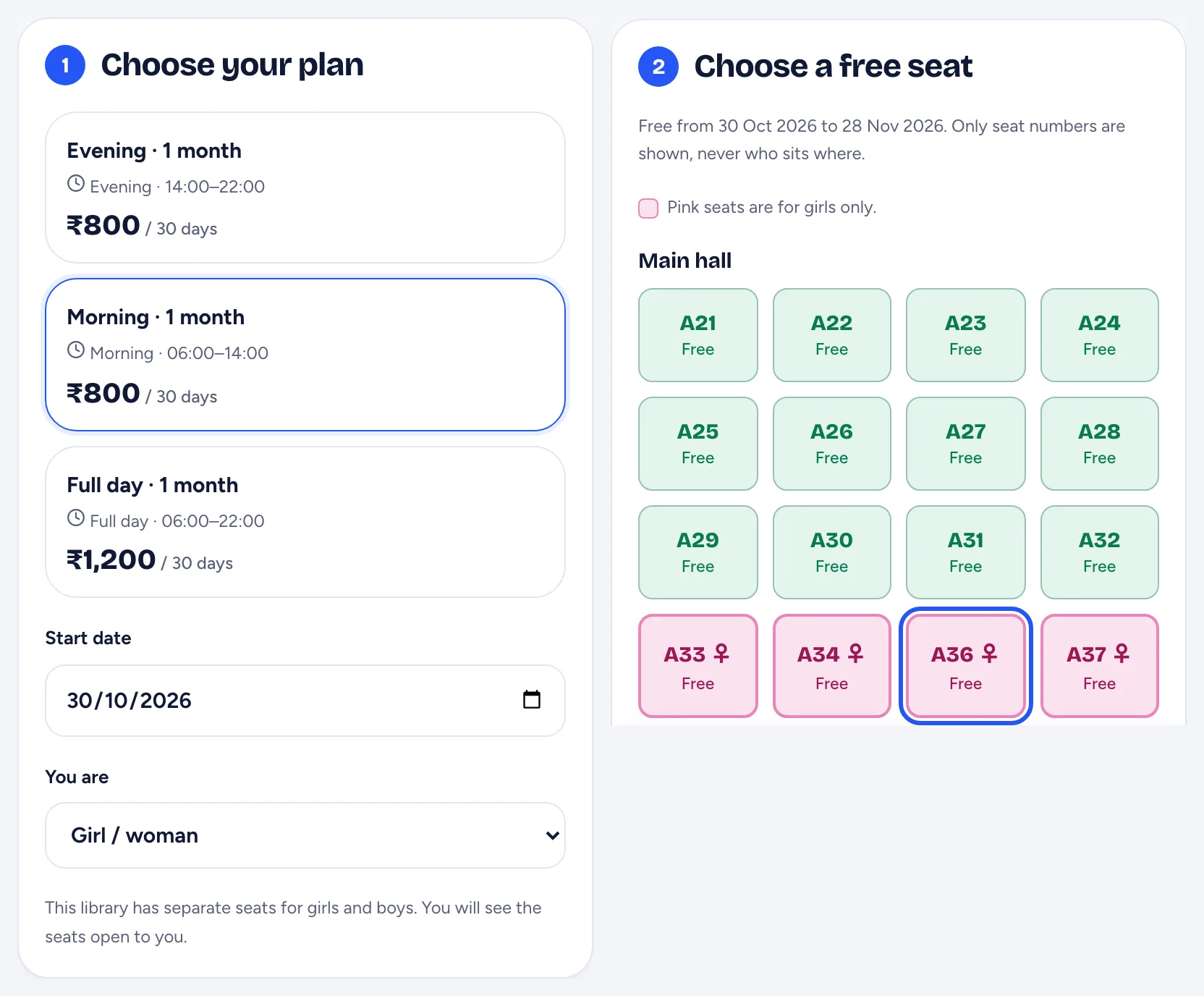
With Libolink, students can register themselves. Your booking link or printed QR poster opens a page where they fill in their details, choose a plan, a start date and a free seat, and pay online, by UPI or at the desk. Students under 18 must add a guardian and are never approved automatically. You approve with one tap, which creates the student, membership, seat and payment record in one go, and the student gets their own login. Students who join at the desk are added from the same details in the app, and existing students come in from Excel in one upload. See online seat booking or start a free 14-day trial.
Frequently asked questions
What should a library registration form include?
The form number, joining date, student name, photo, date of birth, mobile and address, guardian name and phone, the ID you saw, exam or course, plan, shift, seat, fees, deposit, a signed declaration to follow the rules, consent for messages and CCTV, and signatures.
Do I need an Aadhaar copy for library admission?
Usually not. Check an ID and note its type and last four digits instead of keeping a full copy. Collect only the personal data you need, and keep it locked away, as the Digital Personal Data Protection Act, 2023 expects.
Is a guardian signature needed for students under 18?
It is strongly advised. Take the parent or guardian's name, relation and phone number, get their signature or confirmation, and tell them your timings and rules, especially for late shifts.
Can students fill the library registration form online?
Yes. With Libolink's online booking page, students fill in their details, choose a plan and a free seat, and pay on their phone. You approve with one tap, and the student, membership, seat and payment record are created together.
Where should I print the library rules?
On the back of the registration form, so every student signs below the rules they agreed to. Also put a short rule board at the entrance.