

Library Software for Large Study Libraries (300+ Students)
Key takeaways
- At 300 or more students, the problems change: staff mistakes, fee leaks, seat clashes across shifts and too many calls at the desk.
- You need roles and permissions, a clash-proof seat map, fees that confirm themselves, and reports you can trust.
- Libolink gives staff only the pages they need, keeps an audit history, and lets students book and pay online so the desk does less.
- One plan covers up to 1,000 students, 1,000 seats and 25 staff with any number of branches; larger libraries and chains get a custom plan by email at info@libolink.com or a call on 9170055568.
A large study library is a different business from a small one. With 300 or more students, three or four shifts, several staff and sometimes more than one branch, the owner can no longer see everything personally. Software has to do that job. This guide covers what a large library needs and how Libolink handles it.
What changes when a library grows
- More hands touch the money. Reception, managers and accounts staff all collect fees. Without clear permissions and a record of who did what, small leaks add up.
- Seats are sold several times a day. A seat can belong to a morning student and an evening student. Giving the same seat twice in overlapping times is easy to do by mistake.
- The desk is always busy. Enquiries, renewals, "I paid by UPI" and seat changes all arrive at once.
- You need numbers, not guesses: collections, dues, expenses and profit by day, month and branch.
Staff who see only their job
Libolink has ready-made roles (Reception desk, Manager, Accounts, View only) and lets you tick permissions one by one. A receptionist can mark attendance and record a payment but cannot approve refunds or see reports. Staff can be limited to their own branch. Every important change is kept in the audit history, so you can always see who changed what. Read Multi-Branch Library Software for the details.
Seats that cannot be given twice
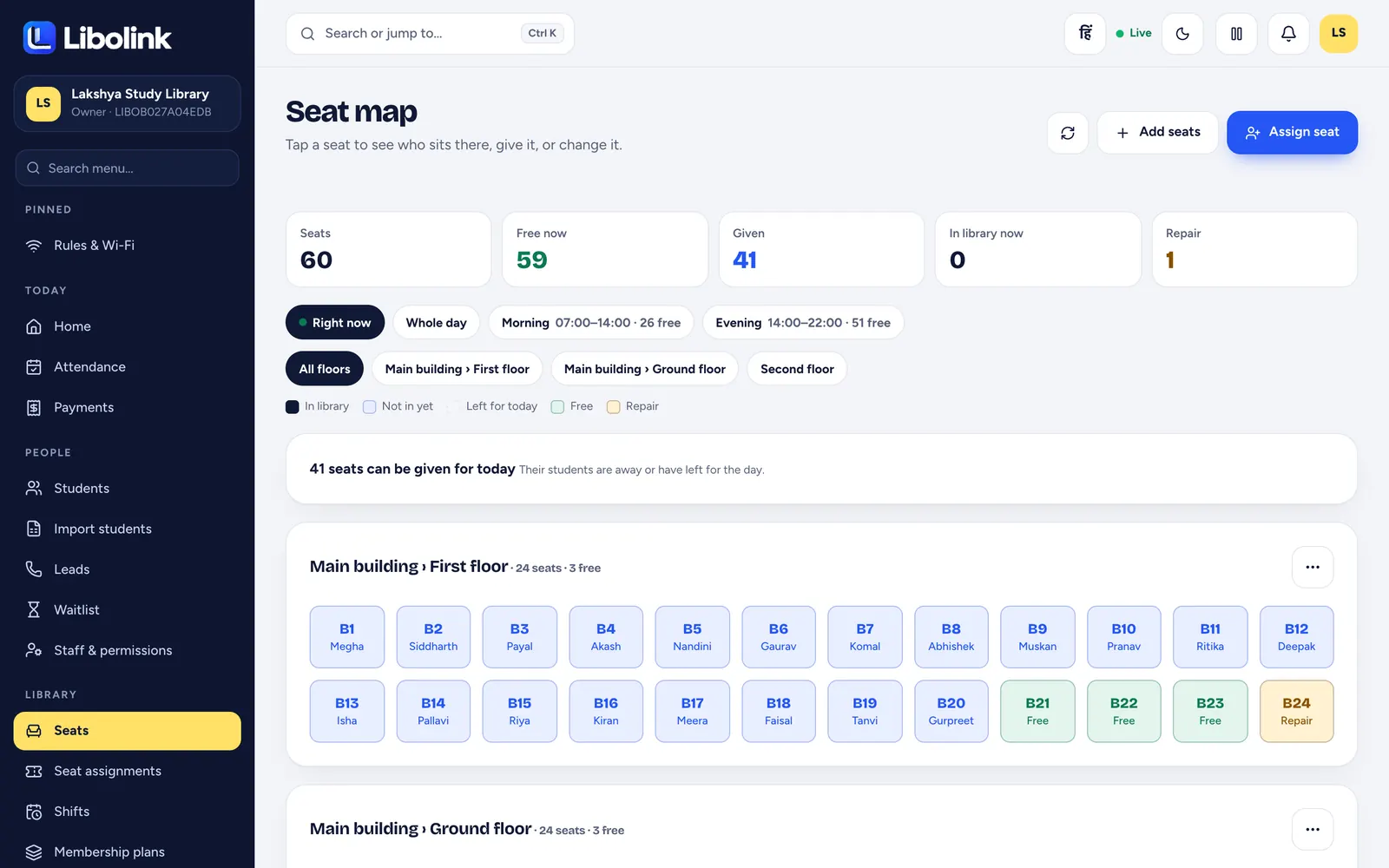
The seat map groups seats by building, floor and room and checks every assignment against overlapping shift times, so the same seat is never given twice. You see who is in the library right now, who has not come and who has left; an empty seat can be given to another student for the day. Girls-only and boys-only sections show in colour. See Library Seat Map Software.
Fees that confirm themselves
- Students pay your UPI with the exact amount filled in; staff match the UTR before a receipt is issued.
- Connect your own Razorpay account and online payments confirm themselves with an automatic receipt.
- Reminders go out 7, 3 and 1 days before the due date, on the day and after, in the app and on WhatsApp.
- Libolink takes no commission on student fees. See Fees Without Commission.
Let students do the desk work
- Online seat booking. Students book and pay from a QR poster or link; with automatic approval for online payments, the student gets their seat, Student ID and login without a single call. See Online Seat Booking.
- A student app with a digital library card, fees and receipts, notices, attendance, study timer and study material, so students stop asking the desk.
- QR attendance that changes every 90 seconds, with an optional location check, so check-ins cannot be faked.
Reports for the owner
The business page shows fee revenue, expenses, estimated profit and outstanding fees for any period, and every list exports to Excel, so you can check the whole business from your phone wherever you are.
Bigger than one plan?
Libolink's plan covers up to 1,000 students, 1,000 seats and 25 staff accounts, with any number of branches, at ₹499 a month at the time of writing. If your library or chain is bigger, or you need special billing, write to info@libolink.com or call 9170055568 (also on WhatsApp) for a custom plan. Read Custom Libolink Plans.
How to move a large library
- Import your students from Excel; the template has Hindi instructions.
- Add seats in ranges by floor, and shifts from presets.
- Create staff logins with roles, branch by branch.
- Book free staff training for your desk team (email info@libolink.com or call 9170055568); see Free Staff Training and Growth Consultancy.
- Run one fee cycle in the 30-day free trial before you switch fully.
Frequently asked questions
Can Libolink handle a library with 500 students?
Yes. The standard plan covers up to 1,000 students, 1,000 seats and 25 staff accounts, with any number of branches. Larger libraries and chains can ask for a custom plan at info@libolink.com or 9170055568.
How does Libolink stop staff fee mistakes?
Staff get only the permissions you give them, UPI payments are approved after matching the UTR, online payments confirm themselves, and the audit history records who changed what.
Can students book seats without calling the desk?
Yes. With online seat booking, students book and pay from a QR poster or link. With automatic approval for online payments, they get the seat, Student ID and login without a call.
Does Libolink charge per branch?
No. Any number of branches are included in one plan. Students, seats and staff are counted across all branches.