

Library Management in India: A Complete Guide for 2026
Key takeaways
- Managing a self-study library in India means six jobs: seats by shift, fees, attendance, students, staff and finding new students.
- Registers and Excel work for a few seats, but break down with shifts, staff, UPI payments and renewals.
- Good software checks seat clashes, matches UPI payments, sends reminders, gives students an app and lets them book seats online.
- Libolink does all of this in one plan, with a 30-day free trial, free staff training and growth consultancy, and custom plans for any size.
India has a large and growing number of self-study libraries and reading rooms, from 20 seats above a shop to multi-floor centres with several branches. Students preparing for UPSC, SSC, banking, NEET and JEE rent a seat by shift and study for months. Running one well is a real business, and this guide explains what "library management" means in India today and how to do it with less effort.
The six jobs of a study library
- Seats and shifts. The same seat is sold to a morning and an evening student. You must know which seat is free in which shift, floor by floor.
- Fees. Most students pay by UPI, some by cash. You need to know who paid, who owes and when each plan ends.
- Attendance. Parents and owners want to know who came, and fake check-ins must be stopped.
- Students. Notices, rules, Wi-Fi, complaints and study material all need to reach them.
- Staff. Desk staff collect money and give seats, so each person needs the right access.
- New students. Enquiries, walk-ins, Google searches and word of mouth have to turn into admissions.
Register, Excel or software?
| Method | Works when | Breaks when |
|---|---|---|
| Paper register | A handful of seats, one person, cash fees | Shifts, UPI payments, renewals and staff arrive |
| Excel or Google Sheets | One person updating it daily | Two people edit it, seats clash, nobody sends reminders |
| Library management software | Any size | You pick software built for book lending instead of seat rental |
Read Library Register Formats if you are still on paper, and How to Choose Library Management Software for the checklist.
What good software does for each job
- Seats: a seat map by floor and shift that refuses to give the same seat twice, and shows who is in the library right now. See Library Seat Map Software.
- Fees: students pay your own UPI with the exact amount, staff match the UTR before a receipt, and online payments confirm themselves. See Fees Without Commission.
- Reminders: fee and renewal reminders 7, 3 and 1 days before the due date and after it, in the app and on WhatsApp. See Library Fee Reminders.
- Attendance: a QR code that keeps changing, with an optional location check. See Library Attendance: QR vs Register.
- Students: an app with a library card, receipts, notices, a study timer and study material.
- Staff: ready-made roles and permissions, and branch limits.
- New students: a free library website, an enquiry form, and online seat booking from a QR poster. See Online Seat Booking.
How Libolink manages a library
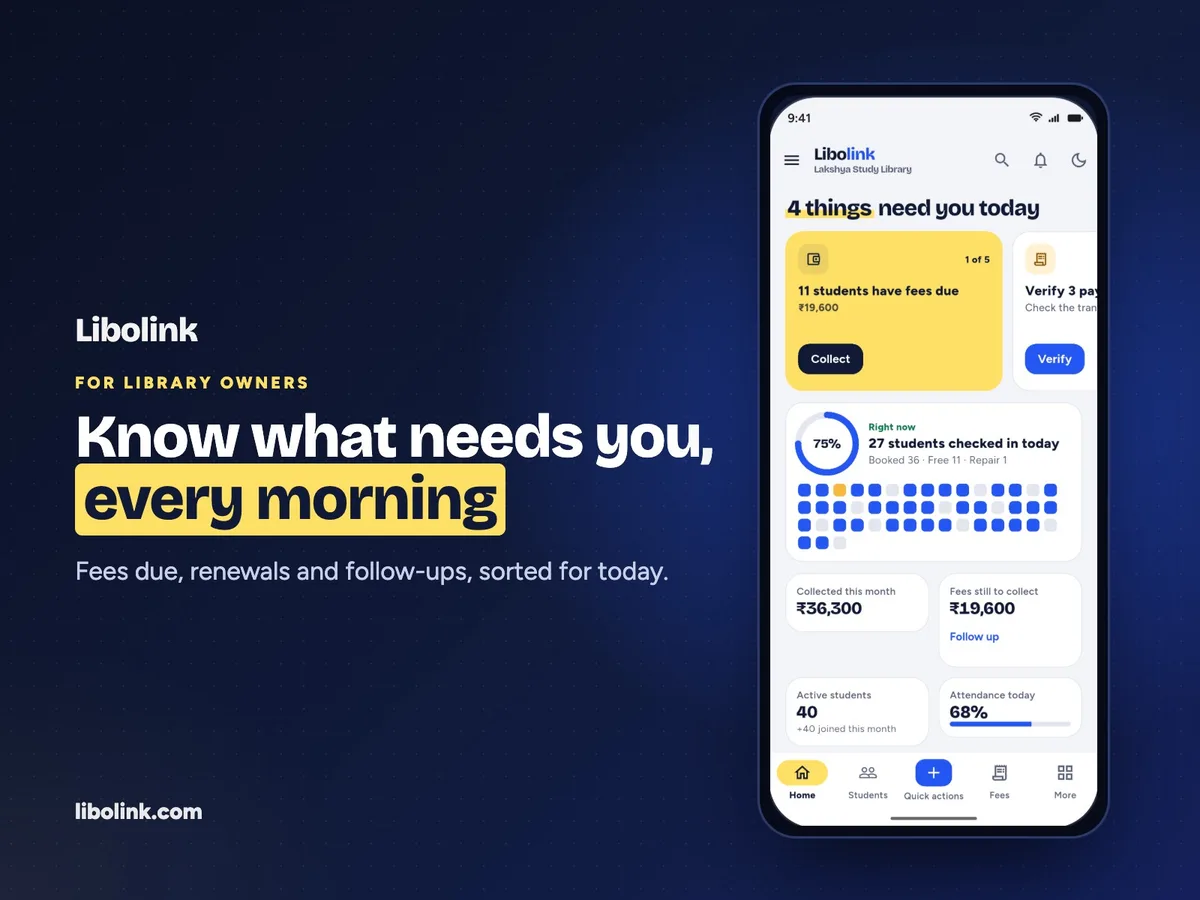
Libolink is built only for self-study libraries and reading rooms in India. In one plan it includes the seat map, UPI and Razorpay fees with no commission, 7-3-1 reminders with WhatsApp, QR attendance, a student app, online seat booking with girls-only sections, a free library website, staff roles and any number of branches, in Hindi and English. Read Why Libolink Is the Best Fit for the full list.
Help to set up and grow, free
Every library on Libolink, including during the free trial, gets free staff training and free growth consultancy by phone or WhatsApp, video call, or a visit where our team can reach, in Hindi or English. Growth advice covers new admissions, fees and renewals, pricing your plans and opening a new branch. See Free Staff Training and Growth Consultancy.
Which library is Libolink for?
- Small libraries (20 to 80 seats) run by the owner. See Best Library Software for a Small Study Library.
- Large libraries (300 or more students) with staff and several shifts. See Library Software for Large Study Libraries.
- Chains and multi-branch libraries. See Multi-Branch Library Software.
- Libraries with a separate girls section. See Girls Section in a Study Library.
Libraries that lend books (school, college and public libraries) need catalogue software instead. For other apps, see Best Library Management Software in India 2026, Compared.
How to start
- Start the 30-day free trial. No card is needed.
- Ask for your free staff training: email info@libolink.com or call or WhatsApp 9170055568.
- Add your shifts, plans and seats, and import your students from Excel.
- Switch on reminders and online booking, and print your QR poster.
If the standard plan does not fit your library's size, ask for a custom plan.
Frequently asked questions
What is the best library management software in India for study libraries?
For self-study libraries and reading rooms, our pick is Libolink: seats by shift, UPI fees with no commission, 7-3-1 reminders, QR attendance, a student app, online seat booking and girls-only sections in one plan, with free staff training and growth consultancy.
How do I manage a self-study library in India?
Handle six jobs: seats by shift, fees, attendance, students, staff and new admissions. Software like Libolink does all six in one app, so one person can run a small library from a phone.
Is there free help to set up library software?
With Libolink, yes. Every library, including during the free trial, gets free staff training and growth consultancy. Email info@libolink.com or call 9170055568.
Can I manage a library without software?
A register or Excel works for a few seats with one person and cash fees. With shifts, staff, UPI payments and renewals, software saves time and stops lost fees and seat clashes.